Why SSL VPN?

There are three major families of VPN implementations in wide usage today: SSL, IPSec, and PPTP. OpenVPN is an SSL VPN and as such is not compatible with IPSec, L2TP, or PPTP.
The IPSec protocol is designed to be implemented as a modification to the IP stack in kernel space, and therefore each operating system requires its own independent implementation of IPSec.

By contrast, OpenVPN’s user-space implementation allows portability across operating systems and processor architectures, firewall and NAT-friendly operation, dynamic address support, and multiple protocol support including protocol bridging.

There are advantages and disadvantages to both approaches. The principal advantages of OpenVPN’s approach are portability, ease of configuration, and compatibility with NAT and dynamic addresses. The learning curve for installing and using OpenVPN is on par with that of other security-related daemon software such as ssh.

Historically, one of IPSec’s advantages has been multi-vendor support, though that is beginning to change as OpenVPN support is beginning to appear on dedicated hardware devices.

While the PPTP protocol has the advantage of a pre-installed client base on Windows platforms, analysis by cryptography experts has revealed security vulnerabilities.

Microsoft Software Assurance

Microsoft Software Assurance (SA) is a Microsoft maintenance program aimed at business users who use Microsoft Windows, Microsoft Office, and other server and desktop applications. The core premise behind SA is to give users the ability to spread payments over multiple years, while offering « free » upgrades to newer versions during that time period.

The full list of benefits, effective March 2006, are as follows:

  • Free upgrades: Subscribers may upgrade to newer versions of their Microsoft software
  • Access to exclusive software products
  • Training: Free training from Microsoft and access to Microsoft E-Learning, a series of interactive online training tools for users. This training can only be taken at a Microsoft Certified Partner for Learning Solutions and can only be redeemed for training that is categorized as Microsoft Official Curriculum.
  • Home use: Employees of a company with SA can use an additional copy of Microsoft software
  • Access to source code for larger companies (1,500+ desktops)
  • 24×7 telephone and web support
  • Additional error reporting tools
  • Free licenses for additional servers provisioned as « Cold backups » of live servers
  • Access to Microsoft TechNet managed newsgroups
  • Access to Microsoft TechNet downloads for 1 user
  • Extended Hotfix support: Typically Microsoft charges for non-security hotfixes after mainstream support for the product has ended (e.g. 5 years for Windows); this charge is waived for SA customers

All benefits are generated by a Benefits Administrator at the customer organization and can be managed on the Microsoft Volume Licensing Service Center.

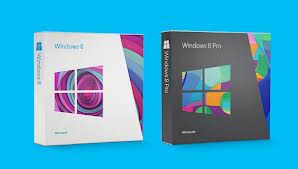
Versions of Windows 8

Windows8

Windows 8
Windows 8 is the basic edition of Windows. This edition contains features aimed at the home users and provides all of the basic new Windows 8 features including the Start screen with semantic zoom, live tiles, Windows Store, Internet Explorer 10, connected standby, Microsoft account integration, the Windows desktop and more.


Windows 8 Pro
Windows 8 Pro is comparable to Windows 7 Professional and Ultimate and is targeted towards enthusiasts and business users; it includes all the features of Windows 8. Additional features include the ability to receive Remote Desktop connections, the ability to participate in a Domain, Encrypting File, Hyper-V, Group Policy, as well as  BitLocker.


Windows 8 Enterprise
Windows 8 Enterprise provides all the features in Windows 8 Pro (except the ability to install the Windows Media Center add-on), with additional features to assist with IT organization. This edition is available to Software Assurance customers, as well as MSDN and Technet Professional subscribers.


Windows RT
Windows RT will only be available pre-installed on ARM-based devices such as tablet PCs. It will include touch-optimized desktop versions of the basic set of Office 2013 applications to users and support device encryption capabilities. Several business-focused features such as Group Policy and domain support are not included.
Desktop software that run on previous versions of Windows cannot be run on Windows RT.

Unlike Windows Vista and Windows 7, there are no Starter, Home Basic, Home Premium, or Ultimate editions.

Microsoft Office 2013

The interface across the entire suite of applications has been reinvented, mostly for the better. First off, the Ribbon, which disappointed many users when it first appeared in Office 2007, remains part of the new Office. But before you start grumbling, consider that Microsoft has made it optional this time around. So now you can show or hide the exhaustive collections of tools across every tab, and decide how much or how little you want to use them.
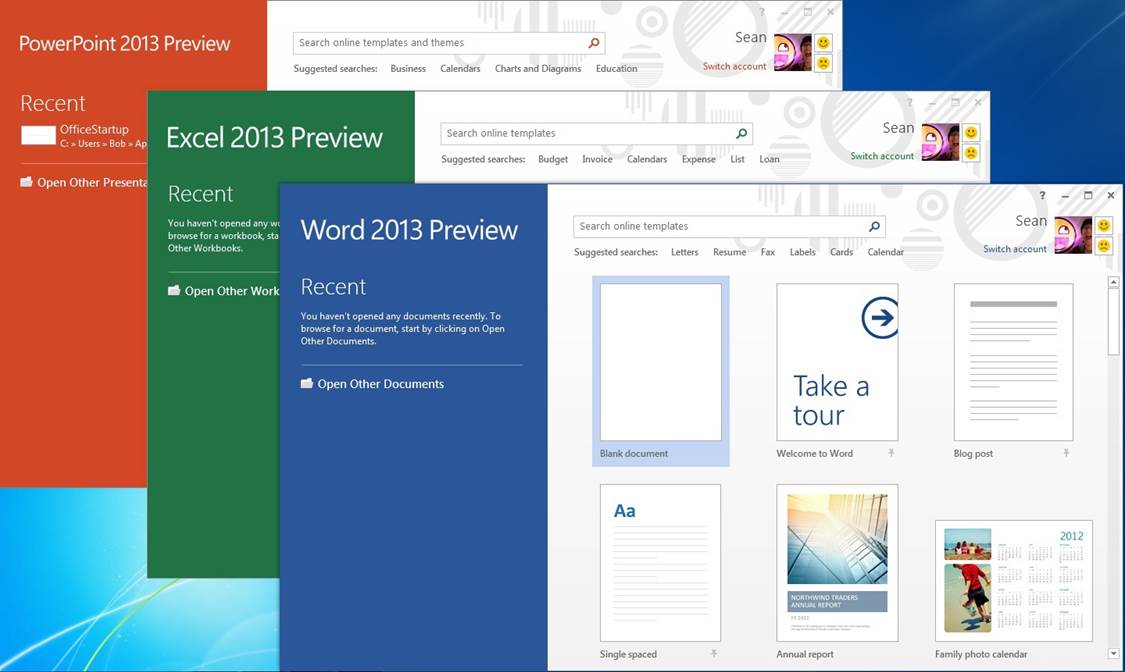
Aside from the Ribbon, the interface is similar but much simpler than it was in Office 2010 and earlier. Newly added start pages for Word, PowerPoint, and Excel help you get to recent documents attached to your account and new templates immediately upon launch. Flat buttons and plenty of white space make the interface look less crowded. Other interface tweaks are tablet-focused such as the radial menus in OneNote that show options (like sharing, search, and zoom tools) in a circle around the area you press. The general feel of the suite is more streamlined and more cloud-integrated, and the new start pages for the core apps will be especially useful for those looking at the same documents on several devices.

Office2013

Though you can only use Office 365 with a subscription on five machines, another new feature called Office on Demand will come in handy whenever you’re away from your selected devices. This feature lets you download a full copy of the software you need (such as Word or Excel) on any PC running Windows 7 or later, and shows you your recent documents just as you’d see them at home. When you’re finished making changes or edits to a document, you can close the application and it is removed from the PC you’re working on.

Office 365

Office 365 primarily denotes a set of subscription based software services that require monthly or periodic payment of fees to Microsoft Corporation.By contrast, Office 20XX generally refers to a suite of desktop applications that alone by themselves are not subscription based and do not carry monthly fees.

Although Office 365 also often refers to cloud-based services rather than desktop applications, certain Office 365 subscription plans include a subscription to Office 20XX desktop applications in addition to cloud-based services. The subscription to Office 20XX desktop applications, by virtue of the subscription, makes the subscription part of an Office 365 offering.

Office 365 was initially announced in the autumn of 2010, and was made available to the public on June 28, 2011. The initial subscription plans included a Professional plan (for organizations of 25 and smaller) and an Enterprise plan (for organizations with more individuals). Depending on the subscription plan, Office 365 can include a subscription to Office 20XX desktop applications, in addition to hosted versions of Microsoft’s Server products (including Exchange Server, SharePoint Server, and Lync Server) that are delivered and accessed over the Internet, in effect, the next version of Business Productivity Online Suite (BPOS).

What is Disk Defragmentation?

Disk defragmentation describes the process of consolidating fragmented files on your computer’s hard disk.

Fragmentation happens to a hard disk over time as you save, change, or delete files. The changes that you save to a file are often stored at a location on the hard disk that’s different from the original file. Additional changes are saved to even more locations. Over time, both the file and the hard disk itself become fragmented, and your computer slows down as it has to look in many different places to open a file.

Disk Defragmenter is a tool that rearranges the data on your hard disk and reunites fragmented files so your computer can run more efficiently. In this version of Windows, Disk Defragmenter runs on a schedule so you don’t have to remember to run it, although you can still run it manually or change the schedule it uses.

Why Use a Solid State Drive?

If you are looking at a modern laptop, chances are you will see some that come equipped with a solid state drive. Solid state drives have several advantages over the magnetic hard drives. The majority of this comes from the fact that the drive does not have any moving parts. While a traditional drive has drive motors to spin up the magnetic platters and the drive heads, all the storage on a solid state drive is handled by flash memory chips. This provides three distinct advantages:

  • Less Power Usage
  • Faster Data Access
  • Higher Reliability

Because there is no power draw for the motors, the drive uses far less energy than the regular hard drive. Since the drive does not have to spin up the drive platter or move drive heads, the data can be read from the drive near instantly. Hard drive platters are very fragile and sensitive materials. Even small jarring movements from an impact can cause the drive to be completely unreadable. Since the SSD stores all its data in memory chips, there are fewer moving parts to be damaged in any sort of impact.

Barracuda Spam & Virus Firewall

The Barracuda Spam & Virus Firewall is an integrated hardware and software solution designed to protect email servers from spam, virus, spoofing, phishing and spyware attacks. It leverages 12 comprehensive defense layers to provide industry-leading defense capabilities for any email server within large corporate or small business environments. It is compatible with all email servers.

Barracuda is one of the leading and most widely used spam filtering appliance. It eliminates spam and virus intrusions while safeguarding an organization’s reputation through content inspection based on policy for both inbound and outbound email. Outbound filtering also prevents confidential or sensitive information from being purposely or inadvertently leaked outside the organization.

The standard deployment configuration of the Barracuda Spam Firewall consists of a single email server and a single Spam Firewall appliance. Simply connect the Barracuda Spam Firewall to your network by assigning it a new IP address and changing your MX record to point to the Barracuda Spam Firewall (see figure below). Alternatively, you may also give your email server a new IP address and give the old IP address to the Barracuda Spam Firewall. Other configurations include one  Barracuda unit and multiple email servers and multiple domains. For automatic scalability, redundancy and fault tolerance, you may cluster multiple Barracuda Spam Firewalls.

Looking for free Antivirus Software?

Antivirus Software provides an essential layer of protection from a multitude of virus, trojan, worm, spyware, adware, dialer, keylogger and rootkit infections.

Here are several free antivirus programs that you can evaluate and decide which one best suit your need:

1) Avast! Free Antivirus
http://www.avast.com/en-au/free-antivirus-download

2) Microsoft Security Essentials –
http://www.microsoft.com/Security_Essentials/

3) Panda Cloud Antivirus –
http://www.free-av.com/en/products/1/avira_antivir_personal__free_antivirus.html

4) AVG Anti-Virus Free Edition –
http://free.avg.com/au-en/homepage

5) Avira AntiVir Personal Edition –
http://www.free-av.com/en/products/1/avira_antivir_personal__free_antivirus.html

What is Forefront TMG?

Forefront Threat Management Gateway (TMG) is a multi-layered perimeter defense system. It’s a network security and protection solution from Microsoft, which they describe as « enables businesses by allowing employees to safely and productively use the Internet for business without worrying about malware and other threats. It’s an enterprise-class firewall with advanced web protection features such as URL filtering, gateway-integrated virus and malicious software scanning, network intrusion detection and prevention, and outbound HTTPS inspection, Forefront TMG provides exceptional protection from advanced, persistent threats. It also provides secure remote access to internal networks and applications and can serve as a consolidated secure mail relay.