Failover Clusters

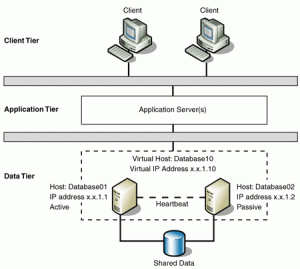
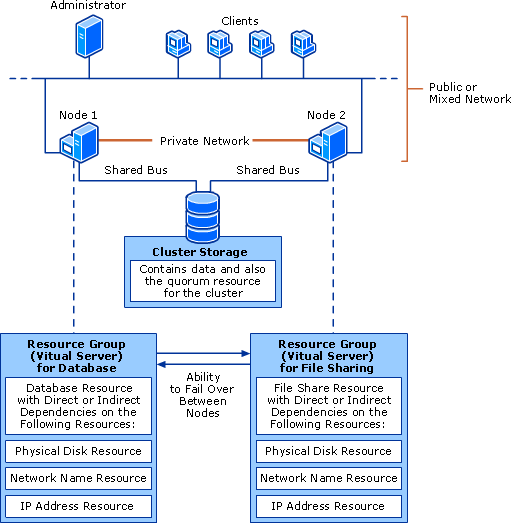
A failover cluster also known as high availability cluster is a group of independent computers that work together to inHAcrease the availability of applications and services. The clustered servers (called nodes) are connected by physical cables and by software. If one of the cluster nodes fails, another node begins to provide service (a process known as failover). Users experience a minimum of disruptions in service. By using a failover cluster, you can ensure that users have nearly constant access to important server-based resources.
Without clustering, if a server running a particular application crashes, the application will be unavailable until the crashed server is fixed. HA clustering remedies this situation by detecting hardware/software faults, and immediately restarting the application on another system without requiring administrative intervention.

What is Domain Parking?

Domain parking refers to the registration of an internet domain name without that domain being associated with any services such as e-mail or a website. This may have been done with a view to reserving the domain name for future development, and to protect against the possibility of cybersquatting. Since the domain name registrar will have set name servers for the domain, the registrar or reseller potentially has use of the domain rather than the final registrant.

Domain parking can be classified as monetized and non-monetized. In the former, advertisements are shown to visitors and the domain is « monetized ». In the latter, an « Under Construction » or a « Coming Soon » message may or may not be put up on the domain by the registrar or reseller. This is a single-page website that people see when they type the domain name or follow a link in a web browser. Domain names can be parked before a web site is ready for launching.

Hyper-V Snapshots

The Hyper-V snapshot feature allows you to capture the configuration and state of a virtual machine (VM) at any point in time, and return a VM to that state without noticeable interruption. When you take

a snapshot of a running VM, Hyper-V briefly pauses the VM to create a new automatic virtual hard disk (AVHD) which is essentially a differencing disk, attaches it to the VM to store changes to the VM data, saves the processor state into a file (.bin), then resumes the VM. Hyper-V also makes a copy of the VM configuration file (.xml), and saves the contents of the VM memory into a file (.vsv). Snapshots can also be created when a VM is turned-off, in which case Hyper-V does not need to capture VM memory or processor state data
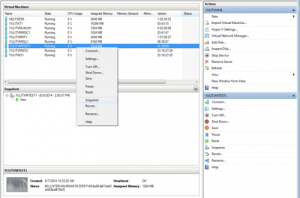
Virtual machine snapshots are file-based snapshots of the state, disk data, and configuration of a virtual machine at a specific point in time. You can take multiple snapshots of a virtual machine, even while it is running. You can then revert the virtual machine to any of the previous states by applying a snapshot to the virtual machine.

To take a snapshot, you can use either Hyper-V Manager or Virtual Machine Connection. All of the other tasks you can perform with snapshots, such as applying or deleting a snapshot, or viewing a list of all snapshots for a specific virtual machine, are available through Hyper-V Manager. You also can inspect or edit the .avhd files, as well as determine which snapshot an .avhd file is associated with.

Software Vs Hardware RAID

A redundant array of independent disks (RAID) allows high levels of storage reliability. RAID is not a backup solution. It is used to improve disk I/O (performance) and reliability of your server or workstation. A RAID can be deployed using both software and hardware.
Below is a quick comparison of hardware vs software RAID.

Feature Software RAID Hardware RAID
Cost:
Software RAID is part of OS, so no need to spend extract money.
Low High
Complexity:
The software RAID works on partition level and it can sometime increase complexity if you mix different partitions and hardware RAID.
Medium to high Low
Write back caching (BBU):
The software RAID cannot add a battery. Hardware RAID can run in write-back mode if it has a BBU installed. With BBU pending writes are not lost on a power failure.
No Yes
Performance:
With the software based RAID0 and RAID1 performance is negligible. However, performance goes down when you use parity-based arrays and/or several arrays at the same time. The performance of a software-based array is dependent on the server CPU performance and current load.
Depend upon usage High
Overheads (CPU, RAM etc): 
The software RAID must use server’s CPU and RAM for RAID software. The more hard drives means more CPU cycle will go to software RAID instead of your Apache / Postfix or MySQL server.
Depend upon usage No
Disk hot swapping:
It means replacing hard disk without shutting down the server. Many RAID controller supports disk hot swapping.
No Yes
Hot spare support:
A hard disk is physically installed in the array which stays inactive until an active drive fails, when the system automatically replaces the failed drive with the spare, rebuilding the array with the spare hard disk included.
Yes Yes
/boot partition:
It is hard to make fail over with software RAID if /boot fails while booting the server. This can result into unexpected errors and data loss. However, LILO and FreeBSD loader can get around this problem too.
No Yes
Open source factor:
*BSD / OpenSolaris and Linux RAID software drivers are open source. It means more people can fix problems as compare to a closed source hardware firmware. You can move, mix and match different sizes with open source software RAID.
Yes No
Vendor lock in (open formats): See above. No Yes
Higher write throughput:
Hardware RAID with BBU may offers higher write throughput.
No Yes
Faster rebuilds:
Hardware RAID with BBU may offers faster rebuilds as compare to software based solution.
No Yes
Can act as a backup solution?:
Both software and hardware RAID cannot protect you against human errors or system failures or viruses. Daily scheduled and off site backups of your system are highly recommended. Use tools such as rsync, rsnapshot, tar, dump, restore and others to make daily backups.
No No
Recommend usage: +Low cost solution
+Better for RAID0 or RAID1
+Single server / workstation
+Perfect for home and small business users.
+No vendor lock-ins
+Do you run a mission critical cluster or setup?
+Heavy database driven dynamic site
+Do you want the highest performance possible?

iSCSI

iSCSI is Internet SCSI (Small Computer System Interface), an Internet Protocol (IP)-based storage networking standard for linking data storage facilities, developed by the Internet Engineering Task Force (IETF). By carrying SCSI commands over IP networks, iSCSI is used to facilitate data transfers over intranets and to manage storage over long distances. The iSCSI protocol is among the key technologies expected to help bring about rapid development of the storage area network (SAN) market, by increasing the capabilities and performance of storage data transmission. Because of the ubiquity of IP networks, iSCSI can be used to transmit data over local area networks (LANs), wide area networks (WANs), or the Internet and can enable location-independent data storage and retrieval.

In essence, iSCSI allows two hosts to negotiate and then exchange SCSI commands using internet protocol (IP) networks. By doing this, iSCSI takes a popular high-performance local storage bus and emulates it over a wide range of networks, creating a storage area network (SAN). Unlike some SAN protocols, iSCSI requires no dedicated cabling; it can be run over existing IP infrastructure. As a result, iSCSI is often seen as a low-cost alternative to fiber channel, which requires dedicated infrastructure except in its FCoE (Fibre Channel over Ethernet) form. However, the performance of an iSCSI SAN deployment can be severely degraded if not operated on a dedicated network or subnet (LAN or VLAN), due to competition for a fixed amount of bandwidth.

Although iSCSI can communicate with arbitrary types of SCSI devices, system administrators almost always use it to allow server computers (such as database servers) to access disk volumes on storage arrays.


CDN (Content Delivery Network)

A content delivery network or content distribution network (CDN) is a large distributed system of servers deployed in multiple data centers across the internet. The goal of a CDN is to serve content to end-users with high availability and high performance. CDNs serve a large fraction of the Internet content today, including web objects (text, graphics and scripts), downloadable objects (media files, software, documents), applications (e-commerce, portals), streaming media, on-demand streaming media, and social networks.

The use of CDN technology has obvious economic advantages to enterprises who expect, or experience, large numbers of hits on their Web sites from locations all over the world. If dozens or hundreds of other users happen to select the same Web page or content simultaneously, the CDN sends the content to each of them without delay or time-out. Problems with excessive latency, as well as large variations in latency from moment to moment (which can cause annoying « jitter » in streaming audio and video), are minimized. The bandwith each user « sees » is maximized. The difference is noticed most by users with high-speed Internet connections who often demand streaming content or large files.

Another advantage of CDN technology is content redundancy that provides a fail-safe feature and allows for graceful degradation in the event of damage to, or malfunction of, a part of the Internet. Even during a large-scale attack that disables many servers, content on a CDN will remain available to at least some users. Still another advantage of CDN technology is the fact that it inherently offers enhanced data backup, archiving, and storage capacity. This can benefit individuals and enterprises who rely on online data backup services.

What is a Cluster?

Microsoft Cluster Server (MSCS) is computer program that allows servers to work together as a computer cluster, to provide failover and increased availability of applications.

Microsoft has three technologies for clustering: Microsoft Cluster Service (MSCS), Component Load Balancing (CLB) , and Network Load Balancing Services (NLB). In windows Server 2008  the MSCS service has been renamed to Windows Server Failover Clustering and the Component Load Balancing (CLB) feature has been deprecated.

cluster

What is Circular Logging?

Circular logging is a method of conserving hard disk space in the Microsoft Exchange Transactional Logging process. It works by overwriting individual log files to keep the transactional log (the set of all log files) from expanding without limit on the hard disk.

When circular logging is disabled, every single log file goes into the transactional log database, and no limit exists as to how large that database can get. When circular logging is enabled, however, the transactional log can only grow to one megabyte (1 MB) in size. After that limit has been reached, the first log file is overwritten automatically to keep the transactional log database from growing any larger. The term « circular » arises from the fact that the set of log files starts to « rotate » once the disk space limit is reached, something like a LIFO (last-in, first-out) queue.

Circular logging is commonly used with Exchange native data protection, because in that mode, backups are not made so a detailed transactional log is not necessary. Circular logging is disabled by default in Exchange 2010. That’s because, if circular logging has been enabled and the database becomes corrupted or otherwise compromised, it cannot be completely recovered if data has been added more recently than the time that the last full backup was created.

CryptoLocker Ransomware Infections

CryptoLocker is a new variant of ransomware that restricts access to infected computers and demands the victim provide a payment to the attackers in order to decrypt and recover their files. As of this time, the primary means of infection appears to be phishing emails containing malicious attachments.

CryptoLocker appears to have been spreading through fake emails designed to mimic the look of legitimate businesses and through phony FedEx and UPS tracking notices.  In addition, there have been reports that some victims saw the malware appear following after a previous infection from one of several botnets frequently leveraged in the cyber-criminal underground.

The malware has the ability to find and encrypt files located within shared network drives, USB drives, external hard drives, network file shares and even some cloud storage drives.  If one computer on a network becomes infected, mapped network drives could also become infected. CryptoLocker then connects to the attackers’ command and control (C2) server to deposit the asymmetric private encryption key out of the victim’s reach.

The following preventative measures to protect their computer networks from a CryptoLocker infection:

  • Conduct routine backups of important files, keeping the backups stored offline.
  • Maintain up-to-date anti-virus software.
  • Keep your operating system and software up-to-date with the latest patches.
  • Do not follow unsolicited web links in email.
  • Use caution when opening email attachments.
  • Follow safe practices when browsing the web.

Windows Storage Server

Windows Storage Server is a version of Windows Server that’s licensed to OEMs for use in network-attached storage appliances. Windows Storage Server 2008 included a couple of features — namely single instance storage (file deduplication) and the Microsoft iSCSI Software Target — that differentiated it from other editions of Windows Server 2008. But there are no such distinguishing characteristics of Windows Storage Server 2012, which has no storage features beyond those found in every other edition of Windows Server 2012. Windows Storage Server 2012 is Windows Storage Server only because it is sold exclusively through Microsoft’s hardware partners with storage systems such as the HP StoreEasy 5530.

Windows Storage Server 2012 is available in Workgroup and Standard editions. The Workgroup license is limited to a single CPU socket, 32GB of RAM, six isks, and 250 concurrent SMB connections. The Standard license supports 64 CPU sockets and 2TB of RAM, and it has no restrictions on the number of disk drives or concurrent SMB connections. Standard also has a number of features — notably fail-over clustering, data deduplication, and the ability to host Hyper-V virtual machines — that you don’t get in the Workgroup edition.