Disable Home WiFi Broadcasting

Most wireless access points and routers automatically transmit their network name (SSID) in the open. This feature of wireless network protocols is intended to allow users to dynamically discover and roam between WLANs.

However, this feature also makes it easier for hackers to break into your home network. Because SSIDs are not encrypted or otherwise scrambled, it becomes easy to grab one by snooping the WLAN looking for SSID broadcast messages coming from the router or AP. Knowing your SSID brings hackers one step closer to a successful intrusion.

In a home WiFi network, roaming is largely unnecessary and the SSID broadcast feature serves no useful purpose. You can disable this feature to improve the security of your WLAN. Once the wireless users are manually configured with the right SSID, they no longer require these broadcast messages.

Note that disabling SSID broadcast is just one of many techniques for tightening security on a wiriless network. This technique is not 100% effective, as hackers can still detect the SSID by sniffing different messages.
Barracuda Spam & Virus Firewall

The Barracuda Spam & Virus Firewall is an integrated hardware and software solution designed to protect email servers from spam, virus, spoofing, phishing and spyware attacks. It leverages 12 comprehensive defense layers to provide industry-leading defense capabilities for any email server within large corporate or small business environments. It is compatible with all email servers.

Barracuda is one of the leading and most widely used spam filtering appliance. It eliminates spam and virus intrusions while safeguarding an organization’s reputation through content inspection based on policy for both inbound and outbound email. Outbound filtering also prevents confidential or sensitive information from being purposely or inadvertently leaked outside the organization.

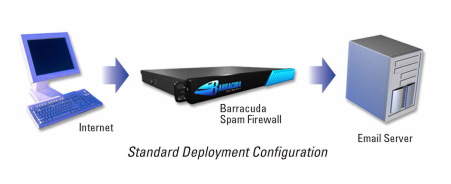
The standard deployment configuration of the Barracuda Spam Firewall consists of a single email server and a single Spam Firewall appliance. Simply connect the Barracuda Spam Firewall to your network by assigning it a new IP address and changing your MX record to point to the Barracuda Spam Firewall (see figure below). Alternatively, you may also give your email server a new IP address and give the old IP address to the Barracuda Spam Firewall. Other configurations include one  Barracuda unit and multiple email servers and multiple domains. For automatic scalability, redundancy and fault tolerance, you may cluster multiple Barracuda Spam Firewalls.

Looking for free Antivirus Software?

Antivirus Software provides an essential layer of protection from a multitude of virus, trojan, worm, spyware, adware, dialer, keylogger and rootkit infections.

Here are several free antivirus programs that you can evaluate and decide which one best suit your need:

1) Avast! Free Antivirus
http://www.avast.com/en-au/free-antivirus-download

2) Microsoft Security Essentials –
http://www.microsoft.com/Security_Essentials/

3) Panda Cloud Antivirus –
http://www.free-av.com/en/products/1/avira_antivir_personal__free_antivirus.html

4) AVG Anti-Virus Free Edition –
http://free.avg.com/au-en/homepage

5) Avira AntiVir Personal Edition –
http://www.free-av.com/en/products/1/avira_antivir_personal__free_antivirus.html

32-bit vs. 64-bit

The terms 32-bit and 64-bit refer to the way a computer’s processor (also called a CPU), handles information. The 64-bit version of Windows handles large amounts of random access memory (RAM)  more effectively than a 32-bit system.64-bit processors can represent larger chunks of data at a time than 32-bit  processors, allowing more efficient handling of all types of computer  calculations. Although 64-bit processing is inherently faster, it also requires  more RAM to accommodate the larger  chunks of data and provide better system performance.

32-bit operating systems can only use about 3.5 gigabytes (GB) of RAM, even if  you install more; 64-bit operating systems can use much more. For example, the  64-bit versions of Windows 7 Professional and Ultimate support up to 192 GB of  RAM. You need at least 4 GB of RAM in order to  experience an increase in system performance with 64-bit processing. If you have  less than 4 GB of RAM, moving to 64-bit could actually decrease system  performance.

Generally, 32-bit software is compatible with 64-bit versions of Windows, but  64-bit software is not compatible with 32-bit versions of Windows. Microsoft  notes that one exception to this is that many 32-bit anti-virus programs do not  work in 64-bit versions of Windows.

Also, it is not possible to upgrade directly from a 32-bit to 64-bit version of Windows or vice versa. If you want to make the change, you  will need to perform a clean install, which means that you will need to back up  your files and reinstall all your software.

SAN vs. NAS – What is the difference?

A NAS is a single storage device that operate on data files, while a SAN is a local network of multiple devices that operate on disk blocks. A SAN commonly utilizes Fiber Channel interconnects. A NAS typically makes Ethernet and TCP/IP connections.

More Differences

NAS

SAN

Almost any machine that can connect to the LAN (or is   interconnected to the LAN through a WAN) can use NFS, CIFS or HTTP protocol   to connect to a NAS and share files. Only server class devices with SCSI Fibre Channel can connect to   the SAN. The Fibre Channel of the SAN has a limit of around 10km at best
A NAS identifies data by file name and byte offsets, transfers   file data or file meta-data (file’s owner, permissions, creation data, etc.),   and handles security, user authentication, file locking A SAN addresses data by disk block number and transfers raw disk   blocks.
A NAS allows greater sharing of information especially between   disparate operating systems such as Unix and NT. File Sharing is operating system dependent and does not exist in   many operating systems.
File System managed by NAS head unit File System managed by servers
Backups and mirrors (utilizing features like NetApp’s Snapshots)   are done on files, not blocks, for a savings in bandwidth and time. A   Snapshot can be tiny compared to its source volume. Backups and mirrors require a block by block copy, even if   blocks are empty. A mirror machine must be equal to or greater in capacity   compared to the source volume.

Can I make phone calls with iPad2 3G?

One of the the questions we’ve heard asked alot by end users is whether they can make phone calls from their iPad 3G. Well, the iPad is not a phone. However, you can make phone calls via one of the iPhone services such as Skype, Facetime, Viber, MobileVOIP, Text Free or any other VOIP apps as long as you have an Internet connection and as long as the other device has the same application installed to establish communication.

LAN

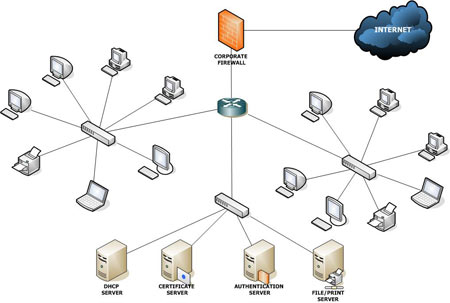
A local area network (LAN) is a computer network hat interconnects computers in a limited area such as a home, school, computer laboratory,  office building.

The defining characteristics of LANs, in contrast to wide area network (WAN), include their usually higher data transfer rates, smaller geographic area, and lack of a need for leased telecommunication lines.

Ethernet over twisted pair cabling, and Wi-Fi are the two most common technologies currently used to build LANs

What is Forefront TMG?

Forefront Threat Management Gateway (TMG) is a multi-layered perimeter defense system. It’s a network security and protection solution from Microsoft, which they describe as « enables businesses by allowing employees to safely and productively use the Internet for business without worrying about malware and other threats. It’s an enterprise-class firewall with advanced web protection features such as URL filtering, gateway-integrated virus and malicious software scanning, network intrusion detection and prevention, and outbound HTTPS inspection, Forefront TMG provides exceptional protection from advanced, persistent threats. It also provides secure remote access to internal networks and applications and can serve as a consolidated secure mail relay.

FTP

File Transfer Protocol (FTP) is a standard network protocol used to transfer files from one host to another host over a TCP-based network, Image Source: wikipedia.orgsuch as the Internet.

FTP is built on a client-server architecture and uses separate control and data connections between the client and server.

FTP users may authenticate themselves using a clear-text sign-in protocol but can connect anonymously if the server is configured to allow it.

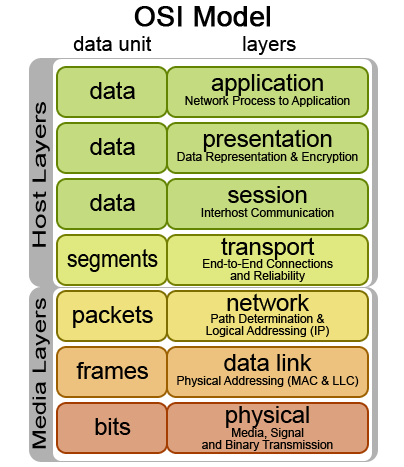
FTP operates on the application layer of the OSI model, and is used to transfer files using TCP/IP. In order to do this an FTP server needs to be running and waiting for incoming requests. The client computer is then able to communicate with the server on port 21.

FTP is relevant because it helps businesses and indididuals share files, information and collaborate with confidence and in a secure matter with active directory integration or with other basis authentication.

IMAP vs. POP3

IMAP (Internet Message Access Protocol) and POP (Post Office Protocol) are different protocols for handling e-mail. Each has its own unique function and purpose. Protocol allows IMAP to deal with e-mail in a different way than POP does.

POP is basically a flow through entity—it just passes on the information to you at your e-mail program. When the POP e-mail server receives e-mail it stores it on the server until you to request it. By simply opening your email program (e.g., Outlook) you request the e-mail from the server by pressing the “Send” or “Receive” button. The e-mail program in essence asks the server if there is any mail waiting. If there is, it tells the server to send it to you.

IMAP on the other hand, is interactive with your e-mail program. It allows you to download e-mails from the server to your e-mail program the same as POP does. However, the difference is that when you request your e-mail from the server it sends a copy rather than sending the entire e-mail. It keeps a copy of the e-mail on the server while simultaneously keeping a copy on your computer.