FTP

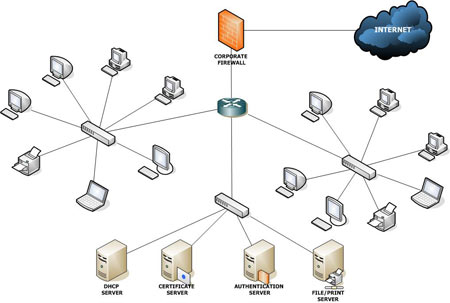
File Transfer Protocol (FTP) is a standard network protocol used to transfer files from one host to another host over a TCP-based network, Image Source: wikipedia.orgsuch as the Internet.

FTP is built on a client-server architecture and uses separate control and data connections between the client and server.

FTP users may authenticate themselves using a clear-text sign-in protocol but can connect anonymously if the server is configured to allow it.

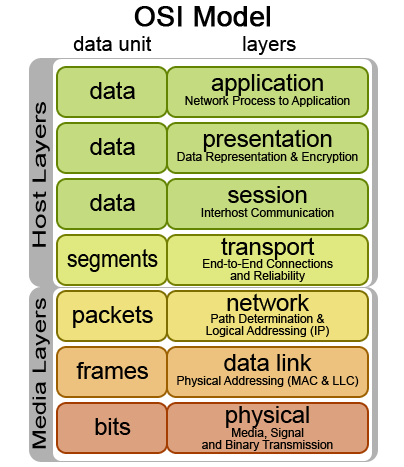
FTP operates on the application layer of the OSI model, and is used to transfer files using TCP/IP. In order to do this an FTP server needs to be running and waiting for incoming requests. The client computer is then able to communicate with the server on port 21.

FTP is relevant because it helps businesses and indididuals share files, information and collaborate with confidence and in a secure matter with active directory integration or with other basis authentication.

IMAP vs. POP3

IMAP (Internet Message Access Protocol) and POP (Post Office Protocol) are different protocols for handling e-mail. Each has its own unique function and purpose. Protocol allows IMAP to deal with e-mail in a different way than POP does.

POP is basically a flow through entity—it just passes on the information to you at your e-mail program. When the POP e-mail server receives e-mail it stores it on the server until you to request it. By simply opening your email program (e.g., Outlook) you request the e-mail from the server by pressing the “Send” or “Receive” button. The e-mail program in essence asks the server if there is any mail waiting. If there is, it tells the server to send it to you.

IMAP on the other hand, is interactive with your e-mail program. It allows you to download e-mails from the server to your e-mail program the same as POP does. However, the difference is that when you request your e-mail from the server it sends a copy rather than sending the entire e-mail. It keeps a copy of the e-mail on the server while simultaneously keeping a copy on your computer.

Server Virtualization

Server virtualization or Hardware virtualization or platform virtualization refers to the creation of a virtual machine that acts like a real computer with an operating system.

Virtual machines are based on the host/guest paradigm. Each guest runs on a virtual imitation of the hardware layer. This approach allows  creation of guests that use different operating systems. The guest has no knowledge of the host’s operating system because it is not aware that it’s not running on real hardware. It does, however, require real computing resources from the host. Those resources can then be allocated on the guest machines (# of CPUs, memory, disk space, network adapters and more…)

Some of the most popular virtualization software include Microsoft Hyper-V, VMWare VSphere, Citrix Xenserver and VirtualBox.

Ubuntu

Ubuntu is a computer operating system based on Linux Kernel and is distributed as a free and open-source software. The word « Ubuntu » is an old African word meaning « humanity”. Ubuntu can be used on all types of PCs and can be downloaded  free of charge on the Ubuntu website. Ubuntu is very stable and secure; it has its own browser (Firefox), its own office application (OpenOffice), its own music player and much more. The Ubuntu Software Centre gives you instant access to thousands of open-source and carefully selected free applications.

Intranet

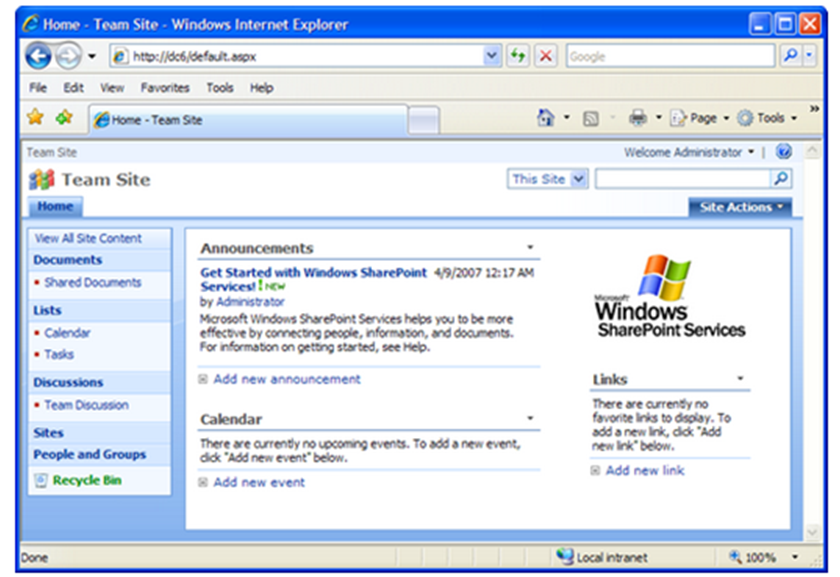
An intranet is a private computer network used to share part of an organisation’s information or operations with employees or partners; it is a website or websites, maintained internally, that are only accessible to authorised users.
Windows SharePoint Services or Sharepoint provides the means to put together an intranet. You can install SharePoint through the ‘Add/Remove Programs’ in Windows Server 2003 R2 or you can download the latest version compatible with your server OS from Microsoft website.

32-Bit vs. 64-bit

The terms 32-bit and 64-bit refer to the way a computer’s processor (also called a CPU), handles information. The 64-bit version of Windows handles large amounts of random access memory (RAM) more effectively than a 32-bit system. Because a 64-bit operating system can handle a large amount of memory (4GB or more), it can be more  efficient than a 32-bit operating system; a 64-bit system can be more responsive when running several programs at the same time and switching between them frequently.

Most programs designed for a computer running a 32-bit version of Windows will work on a computer running 64-bit versions of Windows. Notable exceptions are many antivirus programs, and some hardware drivers. (Microsoft Website).
You cannot upgrade from a 32-bit system to a 64-bit system without going through the process of reeinstalling Windows operating system.

Windows Firewall

Windows 7, Windows Vista, and Windows XP SP2 and higher have a Firewall built-in and turned on by default. A Firewall is a software program or piece of hardware that helps screen out hackers, viruses, and worms that try to reach your computer over the Internet.

To check your Firewall settings on a Windows 7 machine, go to Control Panel –>  Security –> Windows Firewall.