What is Lync?

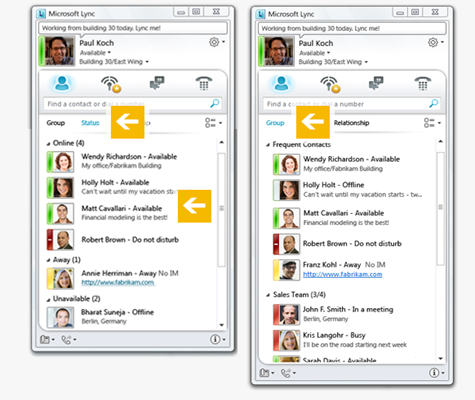
Microsoft Lync is an enterprise-ready unified communications platform. With Lync, users can keep track of their contacts’ availability; send an IM; start or join an audio, video, or web conference; or make a phone call—all through a consistent, familiar interface.Lync is built to fully integrate with Microsoft Office. The Microsoft Lync 2010 desktop client is available for Windows and for Mac and mobile versionsare available for Windows Phone, iPhone/iPad, and Android devices.Microsoft Lync connects users in new ways, regardless of their physical location. The latest release of the Unified Communications platform delivers a fresh, intuitive user experience that is directly accessible from Microsoft Office applications such as Microsoft Outlook, Microsoft Word, and Microsoft SharePoint.Lync brings together the different ways people communicate in a single interface, is deployed as a unified platform, and is administered through a single management infrastructure. The unified nature of the system helps reduce costs and facilitates rapid user adoption. And, because Lync is broadly interoperable, it fits into existing IT infrastructure for easier deployment and migration.

Office 365

Office 365 primarily denotes a set of subscription based software services that require monthly or periodic payment of fees to Microsoft Corporation.By contrast, Office 20XX generally refers to a suite of desktop applications that alone by themselves are not subscription based and do not carry monthly fees.

Although Office 365 also often refers to cloud-based services rather than desktop applications, certain Office 365 subscription plans include a subscription to Office 20XX desktop applications in addition to cloud-based services. The subscription to Office 20XX desktop applications, by virtue of the subscription, makes the subscription part of an Office 365 offering.

Office 365 was initially announced in the autumn of 2010, and was made available to the public on June 28, 2011. The initial subscription plans included a Professional plan (for organizations of 25 and smaller) and an Enterprise plan (for organizations with more individuals). Depending on the subscription plan, Office 365 can include a subscription to Office 20XX desktop applications, in addition to hosted versions of Microsoft’s Server products (including Exchange Server, SharePoint Server, and Lync Server) that are delivered and accessed over the Internet, in effect, the next version of Business Productivity Online Suite (BPOS).

Virtualization Tools Aren’t Just for Geeks

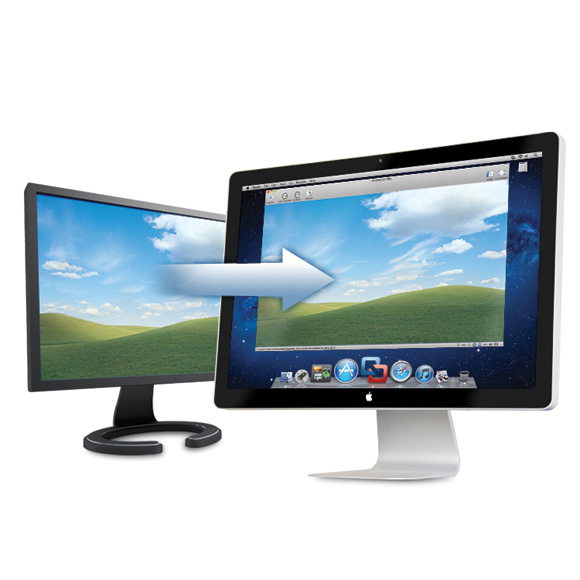
Virtualization software helps you run multiple operating systems on the same computer. For instance, you can use a virtualization tool like Apple Boot Camp or Parallels to run Windows on your Mac computer or you may use the free Virtual PC program from Microsoft to run Linux, DOS or even multiple Windows environments inside your Windows PC.

You may use these programs to try out other operating systems on your computer without disturbing the existing setup. Or, if you have upgraded to a newer OS, you can create a virtual machine of your previous OS and use it to run older programs that aren’t supported in your new OS. Or if you want to run multiple versions of the same software (like Photoshop CS4 and Photoshop CS5), you can install one of them on your main OS and the other inside a virtual machine.

Blackberry Enterprise Server Express

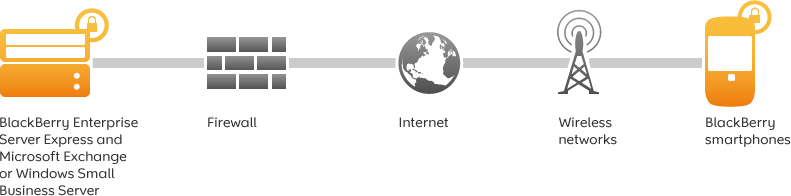
Wirelessly synchronize Microsoft Exchange or IBM Lotus Domino with your employees’ BlackBerry smartphones. BlackBerry Enterprise Server Express provides advanced BlackBerry smartphone business features with no software licence fees or additional per user licence fees.

As of 2010, RIM (Research in Motion) is offering the Blackberry Enterprise Server Express edition with no user limitations – for free. It has a few minor feature limitations, but only requires a data plan – not a BES plan. It enables near-instant seamless mail and calendar integration with your existing exchange server (incoming emails often appear on the Blackberry handset before they appear in the Outlook or OWA clients), which is an advantage over the existing Outlook Web Access model that the Blackberry Internet Service offers.

The BES offers mind blowing control through 450+ IT policies that can be applied to all or selected handhelds in the corporate environment. Some of the policies control SMS, passwords, PIN to PIN, 3rd party apps & remote wipe.

What is Disk Defragmentation?

Disk defragmentation describes the process of consolidating fragmented files on your computer’s hard disk.

Fragmentation happens to a hard disk over time as you save, change, or delete files. The changes that you save to a file are often stored at a location on the hard disk that’s different from the original file. Additional changes are saved to even more locations. Over time, both the file and the hard disk itself become fragmented, and your computer slows down as it has to look in many different places to open a file.

Disk Defragmenter is a tool that rearranges the data on your hard disk and reunites fragmented files so your computer can run more efficiently. In this version of Windows, Disk Defragmenter runs on a schedule so you don’t have to remember to run it, although you can still run it manually or change the schedule it uses.

VMware Fusion: Switching From PC to MAC Made Easy

VMware Fusion is a software developped by VMware for Mac computers, which allows home users, students and business professionals to run Windows programs on their Macs.

This software allows you to run your favorite Windows programs alongside Mac applications without rebooting. Whether you want to run Windows XP, Vista or Windows 7 on a Mac, VMware Fusion’s easy install feature will get you up and running in no time. With the ability to run Windows-only programs like Microsoft Project, Access and Internet Explorer, VMware Fusion turns your Mac into the ultimate computer for compatibility.

You can get the best of both worlds and have access to your Windows programs and all your files from your old PC directly on your Mac, whenever you need them.

Why Use a Solid State Drive?

If you are looking at a modern laptop, chances are you will see some that come equipped with a solid state drive. Solid state drives have several advantages over the magnetic hard drives. The majority of this comes from the fact that the drive does not have any moving parts. While a traditional drive has drive motors to spin up the magnetic platters and the drive heads, all the storage on a solid state drive is handled by flash memory chips. This provides three distinct advantages:

  • Less Power Usage
  • Faster Data Access
  • Higher Reliability

Because there is no power draw for the motors, the drive uses far less energy than the regular hard drive. Since the drive does not have to spin up the drive platter or move drive heads, the data can be read from the drive near instantly. Hard drive platters are very fragile and sensitive materials. Even small jarring movements from an impact can cause the drive to be completely unreadable. Since the SSD stores all its data in memory chips, there are fewer moving parts to be damaged in any sort of impact.

Disable Home WiFi Broadcasting

Most wireless access points and routers automatically transmit their network name (SSID) in the open. This feature of wireless network protocols is intended to allow users to dynamically discover and roam between WLANs.

However, this feature also makes it easier for hackers to break into your home network. Because SSIDs are not encrypted or otherwise scrambled, it becomes easy to grab one by snooping the WLAN looking for SSID broadcast messages coming from the router or AP. Knowing your SSID brings hackers one step closer to a successful intrusion.

In a home WiFi network, roaming is largely unnecessary and the SSID broadcast feature serves no useful purpose. You can disable this feature to improve the security of your WLAN. Once the wireless users are manually configured with the right SSID, they no longer require these broadcast messages.

Note that disabling SSID broadcast is just one of many techniques for tightening security on a wiriless network. This technique is not 100% effective, as hackers can still detect the SSID by sniffing different messages.

Barracuda Spam & Virus Firewall

The Barracuda Spam & Virus Firewall is an integrated hardware and software solution designed to protect email servers from spam, virus, spoofing, phishing and spyware attacks. It leverages 12 comprehensive defense layers to provide industry-leading defense capabilities for any email server within large corporate or small business environments. It is compatible with all email servers.

Barracuda is one of the leading and most widely used spam filtering appliance. It eliminates spam and virus intrusions while safeguarding an organization’s reputation through content inspection based on policy for both inbound and outbound email. Outbound filtering also prevents confidential or sensitive information from being purposely or inadvertently leaked outside the organization.

The standard deployment configuration of the Barracuda Spam Firewall consists of a single email server and a single Spam Firewall appliance. Simply connect the Barracuda Spam Firewall to your network by assigning it a new IP address and changing your MX record to point to the Barracuda Spam Firewall (see figure below). Alternatively, you may also give your email server a new IP address and give the old IP address to the Barracuda Spam Firewall. Other configurations include one  Barracuda unit and multiple email servers and multiple domains. For automatic scalability, redundancy and fault tolerance, you may cluster multiple Barracuda Spam Firewalls.

Looking for free Antivirus Software?

Antivirus Software provides an essential layer of protection from a multitude of virus, trojan, worm, spyware, adware, dialer, keylogger and rootkit infections.

Here are several free antivirus programs that you can evaluate and decide which one best suit your need:

1) Avast! Free Antivirus
http://www.avast.com/en-au/free-antivirus-download

2) Microsoft Security Essentials –
http://www.microsoft.com/Security_Essentials/

3) Panda Cloud Antivirus –
http://www.free-av.com/en/products/1/avira_antivir_personal__free_antivirus.html

4) AVG Anti-Virus Free Edition –
http://free.avg.com/au-en/homepage

5) Avira AntiVir Personal Edition –
http://www.free-av.com/en/products/1/avira_antivir_personal__free_antivirus.html