Microsoft Exchange Sever 2013

Microsoft Exchange Server 2013 enables you to maintain control, increase user productivity, and keep your organization safe. You can move to the cloud on your terms with flexible migration options. Your users can do more on any device, helping them manage increasing volumes of email and work together more effectively as teams. You can also protect your business communications and sensitive information, while meeting internal and regulatory compliance requirements. With Exchange Server 2013, you can work smarter, anywhere.

  • Remain in control, online and on-premises.
    Exchange Server 2013 enables you to tailor your solution based on your unique needs and ensures your communications are always available while you remain in control, on your own terms – online, on-premises, or a hybrid of the two.
  • Do more, on any device.
    Exchange Server 2013 helps your users be more productive by helping them manage increasing volumes of communications across multiple devices and work together more effectively as teams.
  • Keep your organization safe.
    Exchange Server 2013 keeps your organization safe by enabling you to protect business communications and sensitive information to meet internal and regulatory compliance requirements.

Microsoft Exchange Server 2013 Preview brings a new rich set of technologies, features, and services to the Exchange Server product line. Its goal is to support people and organizations as their work habits evolve from a communication focus to a collaboration focus. At the same time, Exchange Server 2013 Preview helps lower the total cost of ownership whether you deploy Exchange 2013 Preview on-premises or provision your mailboxes in the cloud. New features and functionality in Exchange 2013 Preview are designed to do the following:

  • Support a multigenerational workforce   Social integration and making it easier to find people is important to users. Smart Searchlearns from users’ communication and collaboration behavior to enhance and prioritize search results in Exchange. Also, with Exchange 2013 Preview, users can merge contacts from multiple sources to provide a single view of a person, by linking contact information pulled from multiple locations.
  • Provide an engaging experience   Microsoft Outlook 2013 Preview and Microsoft Office Outlook Web App have a fresh new look. Outlook Web App emphasizes a streamlined user interface that also supports the use of touch, enhancing the mobile device experience with Exchange.
  • Integrate with SharePoint and Lync   Exchange 2013 Preview offers greater integration with Microsoft SharePoint 2013 Preview and Microsoft Lync 2013 Preview through site mailboxes and In-Place eDiscovery.
  • Help meet evolving compliance needs    Compliance and eDiscovery are challenging for many organizations. Exchange 2013 Preview helps you to find and search data not only in Exchange, but across your organization. With improved search and indexing, you can search across Exchange 2013 Preview, Lync 2013 Preview, SharePoint 2013 Preview, and Windows file servers.
  • Provide a resilient solution   Exchange 2013 Preview builds upon the Exchange Server 2010 architecture and has been redesigned for simplicity of scale, hardware utilization, and failure isolation.
Exchange Server 2013

So, what’s new in Exchange Server 2013?

The new features and functionalities include:

Session Indifference: In Exchange 2013, the client access and mailbox components reside on the same Mailbox server and no session affinity is required at the Client Access servers. This allows inbound connections to Client Access servers to be balanced using the techniques provided by load balancing technology such as round-robin and least connection.

Unified Messaging: Unified Messaging in Exchange 2013 contains essentially the same voice mail features included in Exchange 2010. Certain new and enhanced features have also been added to the existing features. Exchange 2013 integrates with SharePoint 2013 to allow users to collaborate more effectively. OAuth authentication lets partner applications to authenticate as a service.

Anti-malware protection: The implicit malware filtering capability of Exchange 2013 helps protect your network from malicious software spreading through email messages. If malware is detected, the message is deleted. Notifications can also be sent to administrators when an infected message is deleted and not delivered.

Batch mailbox moves: This new move architecture is built on top of MRS (mailbox replication service) moves with advanced management capability. The features include:

    • Ability to move multiple mailboxes in large batches.
    • Email notification during move with reporting.
    • Automatic retry and prioritization of moves.
    • Periodic incremental syncs to migrate the changes.

Automatic recovery from storage failures: In addition to the Exchange 2010 bug check behavior, Exchange 2013 includes additional recovery behavior for long I/O times and excessive memory consumption.

Support for multiple databases per disk: Exchange 2013 includes enhancements that enable you to support multiple databases on the same disk.

Automatic reseed: This helps you to quickly restore database redundancy after disk failure. If a disk fails, the database copy stored on that disk is copied from the active database copy to a spare disk on the same server.

Managed Store: The newly rewritten Information Store processes in Exchange 2013 is known as Managed Store. This new Managed Store is written in C# and tightly integrated with the Microsoft Exchange Replication service to provide higher availability.

Blackberry Enterprise Server Express

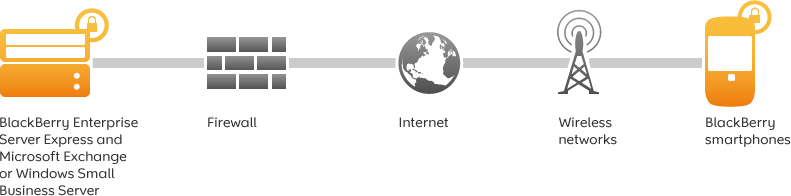
Wirelessly synchronize Microsoft Exchange or IBM Lotus Domino with your employees’ BlackBerry smartphones. BlackBerry Enterprise Server Express provides advanced BlackBerry smartphone business features with no software licence fees or additional per user licence fees.

As of 2010, RIM (Research in Motion) is offering the Blackberry Enterprise Server Express edition with no user limitations – for free. It has a few minor feature limitations, but only requires a data plan – not a BES plan. It enables near-instant seamless mail and calendar integration with your existing exchange server (incoming emails often appear on the Blackberry handset before they appear in the Outlook or OWA clients), which is an advantage over the existing Outlook Web Access model that the Blackberry Internet Service offers.

The BES offers mind blowing control through 450+ IT policies that can be applied to all or selected handhelds in the corporate environment. Some of the policies control SMS, passwords, PIN to PIN, 3rd party apps & remote wipe.

IMAP vs. POP3

IMAP (Internet Message Access Protocol) and POP (Post Office Protocol) are different protocols for handling e-mail. Each has its own unique function and purpose. Protocol allows IMAP to deal with e-mail in a different way than POP does.

POP is basically a flow through entity—it just passes on the information to you at your e-mail program. When the POP e-mail server receives e-mail it stores it on the server until you to request it. By simply opening your email program (e.g., Outlook) you request the e-mail from the server by pressing the “Send” or “Receive” button. The e-mail program in essence asks the server if there is any mail waiting. If there is, it tells the server to send it to you.

IMAP on the other hand, is interactive with your e-mail program. It allows you to download e-mails from the server to your e-mail program the same as POP does. However, the difference is that when you request your e-mail from the server it sends a copy rather than sending the entire e-mail. It keeps a copy of the e-mail on the server while simultaneously keeping a copy on your computer.