Qu’est ce qu’un « Single Point of Failure » ?

SPOF (Single Point of Failure) peut être traduit en français par « point individuel de défaillance ». Un point individuel de défaillance est, comme son nom l’indique, un point qui peut être identifié dans une infrastructure ou une architecture donnée comme étant critique pour cette infrastructure dans le cas où celui-ci vient à défaillir.

L’identification d’un SPOF dans une architecture informatique requiert d’avoir une vue d’ensemble, mais précise de tout ce qui la compose. Un SPOF est un point critique pour une architecture informatique ou un LAN, car il peut rapidement être identifié comme une cible de choix pour mettre à mal un ensemble de machines ou un service. La mise en redondance d’éléments comme des routeurs ou des serveurs offrant des services est de faire en sorte que si l’un tombe ou est surchargé, l’autre prenne le relais.

Connaissant ce principe de fonctionnement, un pirate expérimenté ne perdra pas son temps à attaquer des équipements redondés, seulement s’il a identifié le SPOF qui est le routeur, il deviendra une cible prioritaire, car faire tomber le routeur reviendra à faire tomber le reste de l’infrastructure qui deviendra injoignable. En sécurité informatique, la sécurité de l’ensemble est évaluée par la sécurité la plus basse évaluée sur chacun des composants, lorsque l’on entame des redondances pour mettre un service en mode « haute disponibilité« , il est important de le faire sur toute la chaîne de traitement pour ne pas laisser apparaître de SPOF sur celle-ci.

WPA vs WPA2 for Wireless Security

As the name suggests, WPA2 is a second, newer version of Wireless Protected Access (WPA) security and access control technology for Wi-Fi wireless networking. WPA2 is available on all certified Wi-Fi hardware since 2006 and was an optional feature on some products before that. It is designed to improve the security of Wi-Fi connections by requiring use of stronger wireless encryption than what WPA requires. Specifically, WPA2 does not allow use of an algorithm called TKIP (Temporal Key Integrity Protocol) that has known security holes (limitations).

Most wireless routers for home networks support both WPA and WPA2 and administrators must choose which one to run. Obviously, WPA2 is the simpler, safer choice. Some techies point out that using WPA2 requires Wi-Fi hardware to work harder in running the more advanced encryption algorithms, which can theoretically slow down the network’s overall performance compared to running WPA. Network owners can make their own choice but should run experiments to decide whether they notice any difference in their networks speeds with WPA2 vs. WPA.

Windows 8.1 for Business

Someone’s business device should be just as customized, responsive, and easy to use as their own personal device. Each person in your organization has unique needs. Some need a highly mobile, always connected device. Others need the high performance of a notebook packed with features. Windows 8.1 provides flexibility and choice across a range of options–touch, type, or voice input–individuals can choose the device that best fits their needs.

Workers can customize their Windows 8.1 Preview device to suit their individual needs and work styles. Multiple windows and multimonitor enhancements allow workers to arrange their apps, sites, customize their Start screen, and change their desktop just the way they need to. IT professionals can allow workers to customize their Start screen with relevant apps and live tiles or they can choose to manage the Start screen experience through Group Policy either for individuals or for groups.

With new desktop enhancements, including the new Start button, workers can easily transition between the Start screen and the desktop. IT professionals can also customize the Start button to open the Apps view, which provides a complete list of installed apps. This list can be reordered by category, date, or name, and desktop apps can appear at the front of the list. Windows 8.1 can also boot right to the desktop. In fact, you can start directly in any view– the Start screen, Apps view, the desktop, or even a single app. Make important apps easily accessible in the Start screen on company-issued devices. This includes the ability to manage different Start screen configurations for different groups and roles by using Group Policy.

With assigned access, you can enable a single Windows Store app experience on dedicateduse devices. You might want to run a customer service app in a retail store device, or have a single learning app running in school. Enabling assigned access turns on a predefined set of  filters that blocks other actions so the specified app runs and system files and other apps can’t be accessed. Windows 8.1 makes managing personal devices much easier for Bring Your Own Devices

(BYOD) programs. New features make it possible to more securely allow access to corporate resources–like work folders, apps, and services–from any Internet connection. The management,security, monitoring, and compliance benefits of Windows Server,
Active Directory, Group Policy, Domain Join, System Center, Windows Intune, and MDOP, can continue to support devices running Windows 8.1. You can also benefit from the high levels of hardware and software compatibility with Windows 8.1. The majority of Windows
desktop apps and Windows Store apps will run on Windows 8.1.

Windows 8.1 Preview delivers enterprise-grade security through enhanced access control, improved data protection, and new features that make devices less susceptible to malware threats. Windows 8.1 Preview and Windows Server together introduce many features that make  it easier for you to embrace BYOD programs, keeping your people productive on their own mobile devices, while company information is protected. Windows 8.1 gives you more options to manage user-owned and controlled devices. New Open Mobile Alliance Device Management (OMA-DM) capabilities are built in and enable mobile device management using third-party MDM solutions with no additional agent required. Enhanced policies allow you to manage more settings from both Windows Intune and the third-party MDM solutions for both Windows 8.1 and Windows RT 8.1 devices.

Windows 8.1 personal devices include an option to join the workplace, allowing workers to access network resources, such as a SharePoint site from their personal devices. They can also choose to enroll in the device management service, to gain access to access
to the company portal, get corporate apps, and manage their own device. With work folders, they can access their work files across all their devices, with automatic synchronization to your file servers in your data center and back out to their other devices. IT professionals can enforce dynamic access control policies on the Work Folder Sync Share (including automated rights management.) When workers remove their device from the corporate network, the corporate data can no longer be accessed.

Why SSL VPN?

There are three major families of VPN implementations in wide usage today: SSL, IPSec, and PPTP. OpenVPN is an SSL VPN and as such is not compatible with IPSec, L2TP, or PPTP.
The IPSec protocol is designed to be implemented as a modification to the IP stack in kernel space, and therefore each operating system requires its own independent implementation of IPSec.

By contrast, OpenVPN’s user-space implementation allows portability across operating systems and processor architectures, firewall and NAT-friendly operation, dynamic address support, and multiple protocol support including protocol bridging.

There are advantages and disadvantages to both approaches. The principal advantages of OpenVPN’s approach are portability, ease of configuration, and compatibility with NAT and dynamic addresses. The learning curve for installing and using OpenVPN is on par with that of other security-related daemon software such as ssh.

Historically, one of IPSec’s advantages has been multi-vendor support, though that is beginning to change as OpenVPN support is beginning to appear on dedicated hardware devices.

While the PPTP protocol has the advantage of a pre-installed client base on Windows platforms, analysis by cryptography experts has revealed security vulnerabilities.

Barracuda Spam & Virus Firewall

The Barracuda Spam & Virus Firewall is an integrated hardware and software solution designed to protect email servers from spam, virus, spoofing, phishing and spyware attacks. It leverages 12 comprehensive defense layers to provide industry-leading defense capabilities for any email server within large corporate or small business environments. It is compatible with all email servers.

Barracuda is one of the leading and most widely used spam filtering appliance. It eliminates spam and virus intrusions while safeguarding an organization’s reputation through content inspection based on policy for both inbound and outbound email. Outbound filtering also prevents confidential or sensitive information from being purposely or inadvertently leaked outside the organization.

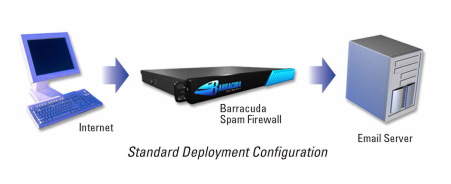
The standard deployment configuration of the Barracuda Spam Firewall consists of a single email server and a single Spam Firewall appliance. Simply connect the Barracuda Spam Firewall to your network by assigning it a new IP address and changing your MX record to point to the Barracuda Spam Firewall (see figure below). Alternatively, you may also give your email server a new IP address and give the old IP address to the Barracuda Spam Firewall. Other configurations include one  Barracuda unit and multiple email servers and multiple domains. For automatic scalability, redundancy and fault tolerance, you may cluster multiple Barracuda Spam Firewalls.

Looking for free Antivirus Software?

Antivirus Software provides an essential layer of protection from a multitude of virus, trojan, worm, spyware, adware, dialer, keylogger and rootkit infections.

Here are several free antivirus programs that you can evaluate and decide which one best suit your need:

1) Avast! Free Antivirus
http://www.avast.com/en-au/free-antivirus-download

2) Microsoft Security Essentials –
http://www.microsoft.com/Security_Essentials/

3) Panda Cloud Antivirus –
http://www.free-av.com/en/products/1/avira_antivir_personal__free_antivirus.html

4) AVG Anti-Virus Free Edition –
http://free.avg.com/au-en/homepage

5) Avira AntiVir Personal Edition –
http://www.free-av.com/en/products/1/avira_antivir_personal__free_antivirus.html

What is Forefront TMG?

Forefront Threat Management Gateway (TMG) is a multi-layered perimeter defense system. It’s a network security and protection solution from Microsoft, which they describe as « enables businesses by allowing employees to safely and productively use the Internet for business without worrying about malware and other threats. It’s an enterprise-class firewall with advanced web protection features such as URL filtering, gateway-integrated virus and malicious software scanning, network intrusion detection and prevention, and outbound HTTPS inspection, Forefront TMG provides exceptional protection from advanced, persistent threats. It also provides secure remote access to internal networks and applications and can serve as a consolidated secure mail relay.

Windows Firewall

Windows 7, Windows Vista, and Windows XP SP2 and higher have a Firewall built-in and turned on by default. A Firewall is a software program or piece of hardware that helps screen out hackers, viruses, and worms that try to reach your computer over the Internet.

To check your Firewall settings on a Windows 7 machine, go to Control Panel –>  Security –> Windows Firewall.