EDR vs XDR

Endpoint Detection and Response (EDR) and Extended Detection and Response (XDR) are both cybersecurity solutions aimed at detecting and responding to threats, but they differ in scope and capabilities:

Endpoint Detection and Response (EDR):

  1. Focus: EDR solutions primarily focus on monitoring and responding to security threats at the endpoint level. Endpoints can include devices like desktops, laptops, servers, mobile devices, and any other endpoint connected to a network.
  2. Capabilities: EDR tools monitor endpoint activities in real-time, collecting telemetry data such as process executions, file accesses, registry changes, network connections, and more. This data is analyzed to detect suspicious behavior or indicators of compromise (IOCs).
  3. Response: EDR provides capabilities for incident response directly at the endpoint. This may include isolating infected endpoints, terminating malicious processes, rolling back changes, or triggering alerts for further investigation by security teams.
  4. Integration: EDR solutions often integrate with other security tools and platforms to enhance visibility and automate response actions. They play a crucial role in endpoint protection platforms (EPP) by providing advanced threat detection and response capabilities.

Extended Detection and Response (XDR):

  1. Scope: XDR expands beyond EDR by integrating data from multiple security layers across endpoints, networks, and other security controls such as email gateways, cloud environments, and servers. It provides a unified view of security threats across the entire IT environment.
  2. Integration and Correlation: XDR platforms aggregate and correlate data from diverse sources including EDR, network traffic analysis (NTA), cloud security posture management (CSPM), and more. This holistic approach enables XDR to detect and respond to sophisticated, multi-vector attacks.
  3. Analytics and Automation: XDR utilizes advanced analytics and machine learning to identify patterns and anomalies indicative of potential threats across different security domains. It emphasizes automation for incident detection, investigation, and response, reducing manual effort and response times.
  4. Enhanced Threat Visibility: By integrating data from multiple sources, XDR provides enhanced visibility into complex attack chains that span across endpoints, networks, and cloud environments. This helps security teams to detect and mitigate threats more effectively.

In summary, while EDR focuses on endpoint-specific threat detection and response, XDR extends this capability across multiple security layers and domains, offering a more comprehensive and integrated approach to cybersecurity. XDR is increasingly adopted by organizations seeking to unify their security operations and improve their ability to detect and respond to evolving cyber threats across their entire IT infrastructure.

Fin du support Microsoft Windows XP

Depuis le 8 avril 2014, le support et les mises à jour de Windows XP ne sont plus disponibles.

windows-xp-end-of-support


En quoi consiste la fin du support de Windows XP ?

Une version de Windows non prise en charge ne recevra plus de mises à jour logicielles de Windows Update. Celles-ci incluent des mises à jour de sécurité qui permettent de protéger votre ordinateur contre les virus dangereux, les logiciels espions et autres programmes malveillants susceptibles de voler vos informations personnelles. Windows Update installe également les dernières mises à jour logicielles pour améliorer la fiabilité de Windows

Si vous continuez d’utiliser Windows XP après la fin du support, votre ordinateur fonctionnera encore, mais il pourrait devenir plus vulnérable face aux risques de sécurité et aux virus.

Outre les problèmes de sécurité, des problèmes de compatibilité pourront nuire à vos activités puisque de plus en plus de logiciels ou mises à jour de logiciels ne sont pas compatibles avec Microsoft Windows XP.

L’exécution d’un système d’exploitation qui n’est plus pris en charge peut également soulever de sérieux problèmes en termes de réglementations et de conformité pour certains types d’entreprises.

Comment rester protégé ?

Pour rester protégé après la fin du support, deux options s’offrent à vous :

    1. Mettre à jour votre PC actuel

Vous pouvez installer ou mettre à jour votre ordinateur actuel vers Microsoft Windows 7 (toujours disponible pour achat) ou Microsoft Windows 8.1. Nous vous recommandons de télécharger et d’exécuter l’Assistant Mise à niveau de Windows pour vérifier si votre PC possède la configuration minimale pour cette mise à niveau.

    1. Acheter un nouveau PC

Si votre ordinateur actuel ne peut pas exécuter Windows 7 ou Windows 8.1, vous pouvez vous procurer un nouvel ordinateur. En achetant ce nouvel ordinateur, la licence de Windows 7 ou Windows 8 sera incluse pour son installation.

CryptoLocker Ransomware Infections

CryptoLocker is a new variant of ransomware that restricts access to infected computers and demands the victim provide a payment to the attackers in order to decrypt and recover their files. As of this time, the primary means of infection appears to be phishing emails containing malicious attachments.

CryptoLocker appears to have been spreading through fake emails designed to mimic the look of legitimate businesses and through phony FedEx and UPS tracking notices.  In addition, there have been reports that some victims saw the malware appear following after a previous infection from one of several botnets frequently leveraged in the cyber-criminal underground.

The malware has the ability to find and encrypt files located within shared network drives, USB drives, external hard drives, network file shares and even some cloud storage drives.  If one computer on a network becomes infected, mapped network drives could also become infected. CryptoLocker then connects to the attackers’ command and control (C2) server to deposit the asymmetric private encryption key out of the victim’s reach.

The following preventative measures to protect their computer networks from a CryptoLocker infection:

  • Conduct routine backups of important files, keeping the backups stored offline.
  • Maintain up-to-date anti-virus software.
  • Keep your operating system and software up-to-date with the latest patches.
  • Do not follow unsolicited web links in email.
  • Use caution when opening email attachments.
  • Follow safe practices when browsing the web.

Barracuda Spam & Virus Firewall

The Barracuda Spam & Virus Firewall is an integrated hardware and software solution designed to protect email servers from spam, virus, spoofing, phishing and spyware attacks. It leverages 12 comprehensive defense layers to provide industry-leading defense capabilities for any email server within large corporate or small business environments. It is compatible with all email servers.

Barracuda is one of the leading and most widely used spam filtering appliance. It eliminates spam and virus intrusions while safeguarding an organization’s reputation through content inspection based on policy for both inbound and outbound email. Outbound filtering also prevents confidential or sensitive information from being purposely or inadvertently leaked outside the organization.

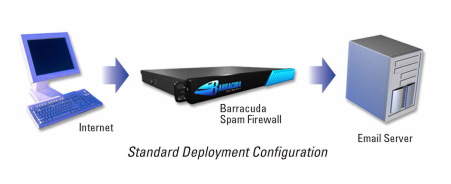
The standard deployment configuration of the Barracuda Spam Firewall consists of a single email server and a single Spam Firewall appliance. Simply connect the Barracuda Spam Firewall to your network by assigning it a new IP address and changing your MX record to point to the Barracuda Spam Firewall (see figure below). Alternatively, you may also give your email server a new IP address and give the old IP address to the Barracuda Spam Firewall. Other configurations include one  Barracuda unit and multiple email servers and multiple domains. For automatic scalability, redundancy and fault tolerance, you may cluster multiple Barracuda Spam Firewalls.

Looking for free Antivirus Software?

Antivirus Software provides an essential layer of protection from a multitude of virus, trojan, worm, spyware, adware, dialer, keylogger and rootkit infections.

Here are several free antivirus programs that you can evaluate and decide which one best suit your need:

1) Avast! Free Antivirus
http://www.avast.com/en-au/free-antivirus-download

2) Microsoft Security Essentials –
http://www.microsoft.com/Security_Essentials/

3) Panda Cloud Antivirus –
http://www.free-av.com/en/products/1/avira_antivir_personal__free_antivirus.html

4) AVG Anti-Virus Free Edition –
http://free.avg.com/au-en/homepage

5) Avira AntiVir Personal Edition –
http://www.free-av.com/en/products/1/avira_antivir_personal__free_antivirus.html