Saas

Saas (Software as a service), sometimes referred to as « on-demand software », is a software delivery model in which software and associated data are centrally hosted on the cloud or internet. SaaS is typically accessed by users using a thin client via a web browser.

SaaS has become a common delivery model for many business applications, including accounting, collaboration, customer relationship management, management information systems, ERP, invoicing, HRM, content management (CM) and service desk management. SaaS has been incorporated into the strategy of all leading enterprise software companies. One of the biggest selling points for these companies is the potential to reduce IT support costs by outsourcing hardware and software maintenance and support to the SaaS provider. Here are some of the benefits of Saas:

High Adoption
SaaS applications are available from any computer or any device—any time, anywhere. Because most people are familiar with using the Internet to find what they need, SaaS apps tend to have high adoption rates, with a lower learning curve.

Lower Initial Costs
SaaS applications are subscription based. No license fees mean lower initial costs. Having the SaaS provider manage the IT infrastructure means lower IT costs for hardware, software, and the people needed to manage it all.
Painless Upgrades
Because the SaaS provider manages all updates and upgrades, there are no patches for customers to download or install. The SaaS provider also manages availability, so there’s no need for customers to add hardware, software, or bandwidth as the user base grows.
Seamless Integration
SaaS vendors with true multitenant architectures can scale indefinitely to meet customer demand. Many SaaS providers also offer customization capabilities to meet specific needs. Plus, many provide APIs that let you integrate with existing ERP systems or other business productivity systems.

Microsoft Office 2013

The interface across the entire suite of applications has been reinvented, mostly for the better. First off, the Ribbon, which disappointed many users when it first appeared in Office 2007, remains part of the new Office. But before you start grumbling, consider that Microsoft has made it optional this time around. So now you can show or hide the exhaustive collections of tools across every tab, and decide how much or how little you want to use them.
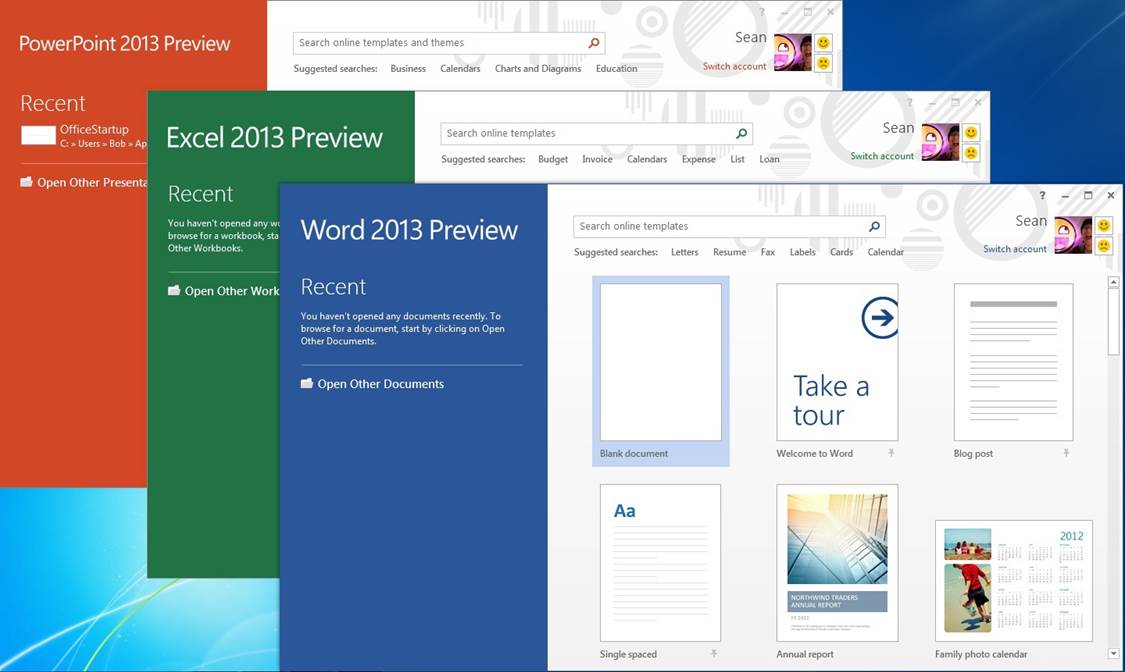
Aside from the Ribbon, the interface is similar but much simpler than it was in Office 2010 and earlier. Newly added start pages for Word, PowerPoint, and Excel help you get to recent documents attached to your account and new templates immediately upon launch. Flat buttons and plenty of white space make the interface look less crowded. Other interface tweaks are tablet-focused such as the radial menus in OneNote that show options (like sharing, search, and zoom tools) in a circle around the area you press. The general feel of the suite is more streamlined and more cloud-integrated, and the new start pages for the core apps will be especially useful for those looking at the same documents on several devices.

Office2013

Though you can only use Office 365 with a subscription on five machines, another new feature called Office on Demand will come in handy whenever you’re away from your selected devices. This feature lets you download a full copy of the software you need (such as Word or Excel) on any PC running Windows 7 or later, and shows you your recent documents just as you’d see them at home. When you’re finished making changes or edits to a document, you can close the application and it is removed from the PC you’re working on.

What is VoIP?

VoIP: Voice over IP  or voice over Internet Protocol commonly refers to the communication protocols, technologies, methodologies, and transmission techniques involved in the delivery of voice communications and multimedia sessions over Internet Protocol (IP) networks, such as the Internet. Other terms commonly associated with VoIP are IP telephony, Internet telephony, voice over broadband (VoBB), broadband telephony, IP communications, and broadband phone.  VOIP

Internet telephony refers to communications services (voice, fax, SMS, and/or voice messaging applications) that are transported via the Internet, rather than the public switched telephone network (PSTN).

The steps involved in originating a VoIP telephone call are signaling and media channel setup, digitization of the analog voice signal, encoding, packetization, and transmission as Internet Protocol (IP) packets over a packet-switched network. On the receiving side, similar steps (usually in the reverse order) such as reception of the IP packets, decoding of the packets and digital-to-analog conversion reproduce the original voice stream.Even though IP telephony and VoIP are used interchangeably, IP telephony refers to all use of IP protocols for voice communication by digital telephony systems, while VoIP is one technology used by IP telephony to transport phone calls.

What is Lync?

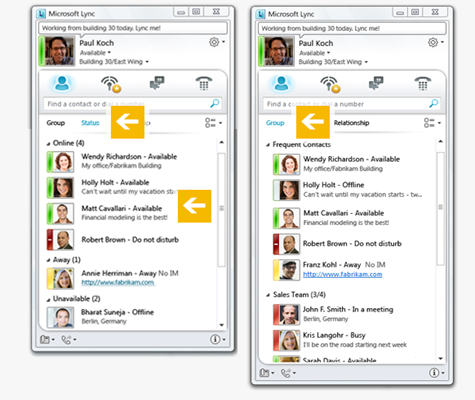
Microsoft Lync is an enterprise-ready unified communications platform. With Lync, users can keep track of their contacts’ availability; send an IM; start or join an audio, video, or web conference; or make a phone call—all through a consistent, familiar interface.Lync is built to fully integrate with Microsoft Office. The Microsoft Lync 2010 desktop client is available for Windows and for Mac and mobile versionsare available for Windows Phone, iPhone/iPad, and Android devices.Microsoft Lync connects users in new ways, regardless of their physical location. The latest release of the Unified Communications platform delivers a fresh, intuitive user experience that is directly accessible from Microsoft Office applications such as Microsoft Outlook, Microsoft Word, and Microsoft SharePoint.Lync brings together the different ways people communicate in a single interface, is deployed as a unified platform, and is administered through a single management infrastructure. The unified nature of the system helps reduce costs and facilitates rapid user adoption. And, because Lync is broadly interoperable, it fits into existing IT infrastructure for easier deployment and migration.

Office 365

Office 365 primarily denotes a set of subscription based software services that require monthly or periodic payment of fees to Microsoft Corporation.By contrast, Office 20XX generally refers to a suite of desktop applications that alone by themselves are not subscription based and do not carry monthly fees.

Although Office 365 also often refers to cloud-based services rather than desktop applications, certain Office 365 subscription plans include a subscription to Office 20XX desktop applications in addition to cloud-based services. The subscription to Office 20XX desktop applications, by virtue of the subscription, makes the subscription part of an Office 365 offering.

Office 365 was initially announced in the autumn of 2010, and was made available to the public on June 28, 2011. The initial subscription plans included a Professional plan (for organizations of 25 and smaller) and an Enterprise plan (for organizations with more individuals). Depending on the subscription plan, Office 365 can include a subscription to Office 20XX desktop applications, in addition to hosted versions of Microsoft’s Server products (including Exchange Server, SharePoint Server, and Lync Server) that are delivered and accessed over the Internet, in effect, the next version of Business Productivity Online Suite (BPOS).

Virtualization Tools Aren’t Just for Geeks

Virtualization software helps you run multiple operating systems on the same computer. For instance, you can use a virtualization tool like Apple Boot Camp or Parallels to run Windows on your Mac computer or you may use the free Virtual PC program from Microsoft to run Linux, DOS or even multiple Windows environments inside your Windows PC.

You may use these programs to try out other operating systems on your computer without disturbing the existing setup. Or, if you have upgraded to a newer OS, you can create a virtual machine of your previous OS and use it to run older programs that aren’t supported in your new OS. Or if you want to run multiple versions of the same software (like Photoshop CS4 and Photoshop CS5), you can install one of them on your main OS and the other inside a virtual machine.

Blackberry Enterprise Server Express

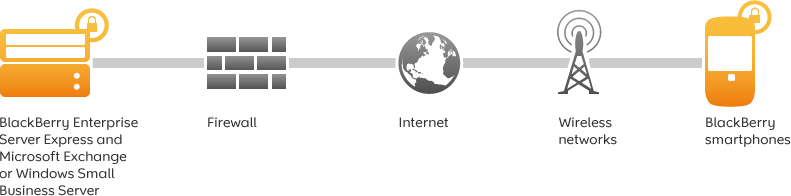
Wirelessly synchronize Microsoft Exchange or IBM Lotus Domino with your employees’ BlackBerry smartphones. BlackBerry Enterprise Server Express provides advanced BlackBerry smartphone business features with no software licence fees or additional per user licence fees.

As of 2010, RIM (Research in Motion) is offering the Blackberry Enterprise Server Express edition with no user limitations – for free. It has a few minor feature limitations, but only requires a data plan – not a BES plan. It enables near-instant seamless mail and calendar integration with your existing exchange server (incoming emails often appear on the Blackberry handset before they appear in the Outlook or OWA clients), which is an advantage over the existing Outlook Web Access model that the Blackberry Internet Service offers.

The BES offers mind blowing control through 450+ IT policies that can be applied to all or selected handhelds in the corporate environment. Some of the policies control SMS, passwords, PIN to PIN, 3rd party apps & remote wipe.

What is Disk Defragmentation?

Disk defragmentation describes the process of consolidating fragmented files on your computer’s hard disk.

Fragmentation happens to a hard disk over time as you save, change, or delete files. The changes that you save to a file are often stored at a location on the hard disk that’s different from the original file. Additional changes are saved to even more locations. Over time, both the file and the hard disk itself become fragmented, and your computer slows down as it has to look in many different places to open a file.

Disk Defragmenter is a tool that rearranges the data on your hard disk and reunites fragmented files so your computer can run more efficiently. In this version of Windows, Disk Defragmenter runs on a schedule so you don’t have to remember to run it, although you can still run it manually or change the schedule it uses.

VMware Fusion: Switching From PC to MAC Made Easy

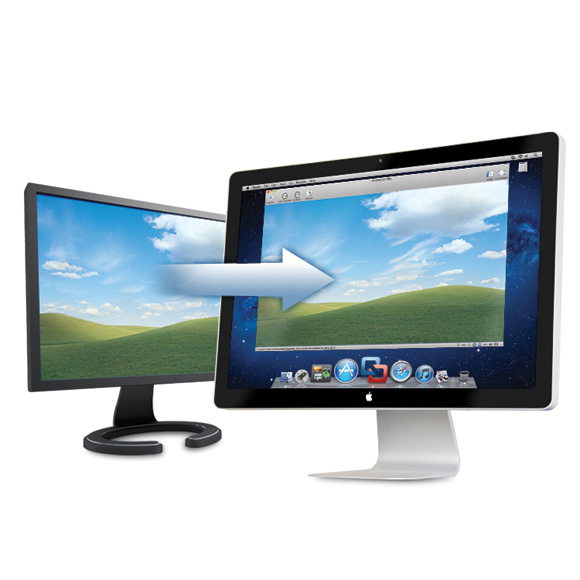
VMware Fusion is a software developped by VMware for Mac computers, which allows home users, students and business professionals to run Windows programs on their Macs.

This software allows you to run your favorite Windows programs alongside Mac applications without rebooting. Whether you want to run Windows XP, Vista or Windows 7 on a Mac, VMware Fusion’s easy install feature will get you up and running in no time. With the ability to run Windows-only programs like Microsoft Project, Access and Internet Explorer, VMware Fusion turns your Mac into the ultimate computer for compatibility.

You can get the best of both worlds and have access to your Windows programs and all your files from your old PC directly on your Mac, whenever you need them.

Why Use a Solid State Drive?

If you are looking at a modern laptop, chances are you will see some that come equipped with a solid state drive. Solid state drives have several advantages over the magnetic hard drives. The majority of this comes from the fact that the drive does not have any moving parts. While a traditional drive has drive motors to spin up the magnetic platters and the drive heads, all the storage on a solid state drive is handled by flash memory chips. This provides three distinct advantages:

  • Less Power Usage
  • Faster Data Access
  • Higher Reliability

Because there is no power draw for the motors, the drive uses far less energy than the regular hard drive. Since the drive does not have to spin up the drive platter or move drive heads, the data can be read from the drive near instantly. Hard drive platters are very fragile and sensitive materials. Even small jarring movements from an impact can cause the drive to be completely unreadable. Since the SSD stores all its data in memory chips, there are fewer moving parts to be damaged in any sort of impact.