EDR vs XDR

Endpoint Detection and Response (EDR) and Extended Detection and Response (XDR) are both cybersecurity solutions aimed at detecting and responding to threats, but they differ in scope and capabilities:

Endpoint Detection and Response (EDR):

  1. Focus: EDR solutions primarily focus on monitoring and responding to security threats at the endpoint level. Endpoints can include devices like desktops, laptops, servers, mobile devices, and any other endpoint connected to a network.
  2. Capabilities: EDR tools monitor endpoint activities in real-time, collecting telemetry data such as process executions, file accesses, registry changes, network connections, and more. This data is analyzed to detect suspicious behavior or indicators of compromise (IOCs).
  3. Response: EDR provides capabilities for incident response directly at the endpoint. This may include isolating infected endpoints, terminating malicious processes, rolling back changes, or triggering alerts for further investigation by security teams.
  4. Integration: EDR solutions often integrate with other security tools and platforms to enhance visibility and automate response actions. They play a crucial role in endpoint protection platforms (EPP) by providing advanced threat detection and response capabilities.

Extended Detection and Response (XDR):

  1. Scope: XDR expands beyond EDR by integrating data from multiple security layers across endpoints, networks, and other security controls such as email gateways, cloud environments, and servers. It provides a unified view of security threats across the entire IT environment.
  2. Integration and Correlation: XDR platforms aggregate and correlate data from diverse sources including EDR, network traffic analysis (NTA), cloud security posture management (CSPM), and more. This holistic approach enables XDR to detect and respond to sophisticated, multi-vector attacks.
  3. Analytics and Automation: XDR utilizes advanced analytics and machine learning to identify patterns and anomalies indicative of potential threats across different security domains. It emphasizes automation for incident detection, investigation, and response, reducing manual effort and response times.
  4. Enhanced Threat Visibility: By integrating data from multiple sources, XDR provides enhanced visibility into complex attack chains that span across endpoints, networks, and cloud environments. This helps security teams to detect and mitigate threats more effectively.

In summary, while EDR focuses on endpoint-specific threat detection and response, XDR extends this capability across multiple security layers and domains, offering a more comprehensive and integrated approach to cybersecurity. XDR is increasingly adopted by organizations seeking to unify their security operations and improve their ability to detect and respond to evolving cyber threats across their entire IT infrastructure.

Email Attacks in Cybersecurity

Email attacks in cybersecurity come in various forms, each with its own strategies and goals aimed at exploiting vulnerabilities in email systems and human behavior. Understanding these differences is crucial for effective defense and mitigation strategies. Here are some common types:

  1. Phishing: This is perhaps the most prevalent form of email attack. Phishing emails impersonate legitimate entities such as banks, companies, or government agencies to trick recipients into revealing sensitive information like passwords or financial details. They often contain urgent messages prompting users to click on malicious links or download attachments.
  2. Spear Phishing: Unlike generic phishing attacks, spear phishing targets specific individuals or organizations. Attackers gather detailed information about their targets to personalize emails, making them appear more legitimate and increasing the likelihood of success. This tactic is often used for corporate espionage or to gain access to high-value accounts.
  3. Whaling: Similar to spear phishing but targeting high-profile individuals like CEOs or senior executives. The aim is to gain access to sensitive company information, financial data, or to facilitate wire transfer fraud by impersonating someone in a position of authority.
  4. Business Email Compromise (BEC): In a BEC attack, criminals compromise legitimate business email accounts through social engineering or phishing. They then use these accounts to conduct fraudulent activities such as requesting unauthorized wire transfers, redirecting payments, or accessing sensitive information.
  5. Email Spoofing: Spoofing involves forging the sender’s address to make an email appear as though it came from a trusted source. This can be used to trick recipients into believing the email is legitimate, thereby increasing the likelihood of successful phishing or malware distribution.
  6. Malware and Ransomware: Emails can also be used to distribute malicious software (malware) or ransomware. Malware can infect systems when users download attachments or click on links in emails, while ransomware encrypts a victim’s files and demands payment for decryption.
  7. Man-in-the-Middle (MitM): While less common in email, MitM attacks can intercept and alter email messages between sender and recipient. This allows attackers to modify information, insert malicious links or attachments, or eavesdrop on communications.
  8. Credential Harvesting: Some attacks aim to steal login credentials by directing users to fake login pages that mimic legitimate services. These pages capture usernames and passwords, which can then be used for further unauthorized access.

Protecting against these attacks requires a multi-layered approach including user education, email filtering and authentication technologies, implementing strong security policies, regularly updating software, and maintaining robust incident response procedures. By understanding the differences between these email attacks, organizations and individuals can better defend against the evolving threats in cyberspace.

Artificial Intelligence (AI) | Regulations | News and Updates

What is AI?

Artificial Intelligence (AI) refers to the simulation of human intelligence in machines that are programmed to think like humans and mimic their actions. The term is often applied to any machine that exhibits traits associated with a human mind such as learning and problem-solving.

AI Usage:

  • AI is the ability of a computer or computer-controlled robot to perform tasks commonly associated with intelligent beings.
  • AI refers to computer systems capable of performing complex tasks that historically only a human could do, such as reasoning, making decisions, or solving problems.
  • AI is an umbrella term that encompasses a wide variety of technologies, including machine learning, deep learning, and natural language processing (NLP).
  • AI is the theory and development of computer systems capable of performing tasks that historically required human intelligence, such as recognizing speech, making decisions, and identifying patterns.
  • AI can assist Improving cybersecurity and fraud management.

The Regulations:

New GDPR Regulations:

  • Consistently cultivate trust with customers.
  • Focus on extracting insight, not personal identifiable information.
  • Comply with EU data protection rules.
  • Understand how to deal with requests from individuals.
  • Know the obligations and principles of GDPR.

Currently USA Related, The Executive Order directs the following actions:

  • Require that developers of the most powerful AI systems share their safety test results and other critical information with the U.S. government.
  • Develop standards, tools, and tests to help ensure that AI systems are safe, secure, and trustworthy.
  • Protect against the risks of using AI to engineer dangerous biological materials by developing strong new standards for biological synthesis screening.

Currently CANADA Related:

Actual Regulation Breakdown in terms of EU/GDPR

EU lawmakers have agreed on the principles of the Act, which is all about a risk-based approach to AI systems:

  • High-risk — These are the big ones like medical devices, critical infrastructures, or systems used for things like recruiting or law enforcement.

They have to meet certain requirements, like having risk-mitigation systems, using high-quality data sets, keeping detailed records, and maintaining strong cybersecurity.

  • Minimal risk — Think of AI systems like spam filters or recommendation engines. They’re pretty harmless and don’t have any special rules to follow.
  • Unacceptable risk — Some systems are just too risky. The Act will ban any AI system or application that poses a clear threat to people’s fundamental rights.

This includes systems that manipulate human behavior or categorize people in real time, there’s a small exception for remote biometric identification used by law enforcement.

  • Specific transparency risk — Users need to know when they’re interacting with AI. So, any deep fakes or AI-generated content must be clearly labelled.

BlueKeep Vulnerability

The National Security Agency (NSA) has recently issued an urgent advisory to ensure that all Windows-based systems are fully-patched and updated. BlueKeep is a software security vulnerability affecting computers using older versions of the Microsoft operating system (mainly Windows 7, Vista, XP, windows Server 2008 and 2003); Windows 8 and Windows 10 are unaffected. Microsoft considers the flaw « critical », and recommends installing available update patches as soon as possible to affected systems to mitigate the vulnerability, as well as disabling Remote Desktop Services if they are not required. This is a serious vulnerability and it should be addressed right away.

Windows 7 – End of the Road

All good things must come to an end, even Windows 7. After January 14, 2020, Microsoft will no longer provide security updates or support for PCs running Windows 7. But you can keep the good times rolling by moving to Windows 10.
You can continue to use Windows 7, but once support ends, your PC will become more vulnerable to security risks. Windows will operate but you will stop receiving security and feature updates.
As long as your PCs meet the hardware requirements, should be able to upgrade to Windows 10, with a valid license.

Microsoft Windows support lifecycle end dates
Windows operating system Latest update or service pack End of mainstream support End of extended support
Windows XP Service Pack 3 14 April 2009 8 April 2014
Windows Vista Service Pack 2 10 April 2012 11 April 2017
Windows 7 Service Pack 1 13 January 2015 14 January 2020
Windows 8 Windows 8.1 9 January 2018 10 January 2023
Windows 10 Service updates provided every March and September Refer to Microsoft Product Lifecycle database 14 October 2025


What is IaaS?

Infrastructure as a service (IaaS) is a form of cloud computing that provides virtualized computing resources over the internet.

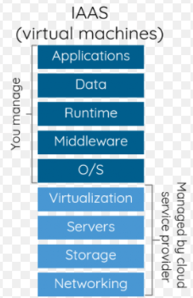
In an IaaS model, a cloud provider hosts the infrastructure components traditionally present in an on-premises data center, including servers, storage and networking hardware, as well as the virtualization or hypervisor layer.

The IaaS provider also supplies a range of services to accompany those infrastructure components. These can include detailed billing, monitoring, log access, security, load balancing and clustering, as well as storage resiliency, such as backup, replication and recovery.

IaaS customers access resources and services through a wide area network, such as the internet, and can use the cloud provider’s services to install the remaining elements of an application stack. For example, the user can log in to the IaaS platform to create virtual machines; install operating systems in each VM; deploy middleware, such as databases; create storage buckets for workloads and backups; and install the enterprise workload into that VM

SSD Hard Drive

A hard drive is essentially a metal platter with a magnetic coating that stores your data.  A read/write head on an arm accesses the data while the platters are spinning.

An SSD does functionally everything a hard drive does, but data is instead stored on interconnected flash memory chips that retain the data even when there’s no power present.
SATA drives come in varying speeds and capacities and SSD drives come in varying capacities. SSDs so much quicker than conventional SATA drives because there are no moving parts, there is no spinning disk like you would find in a SATA drive that has to read and write data to an actual disk. Boot up time is much quicker, cutting it down by 50 percent or more. SSDs are also lighter than the average SATA drive which makes it a great choice for a laptop drive. The one drawback to buying an SSD is cost, as these are pricey hard drives.

Types of SSL/TLS Certificates

Today there are three types of certificates that offer 3 levels of user trust for SSL/TLS negotiations:
Domain Validated certificates (DV), Organization Validated certificate (OV) and Extended Validation certificates (EV).

Domain Validated Certificate
This type of certificate validates that the domain is registered and someone with admin rights is aware of and approves the certificate request. The validation can take from a few minutes to a few hours. The Domain Validated SSL certificate is the most common SSL certificate type because it’s fast to purchase. This validation type is sufficient for the majority of businesses and cheaper compared to Company or Extended validations.
If the certificate is valid and signed by a trusted authority, the browsers indicate a successfully secured HTTPS connection.

Organization Validated Certificate
Organizational certificates are Trusted and they are authenticated by real agents against business registry databases. Additional business documents may be required and the business may be contacted during validation to prove the right of use. OV certificates therefore contain legitimate business information. This is the standard type of certificate required on a commercial or public facing website.

Extended Validation Certificate
The Extended Validation certificate requires an extended validation of the business. It validates domain ownership and organization information, plus the legal existence of the organization. It also validates that the organization is aware of the SSL certificate request and approves it. The validation requires documentation to certify the company identity plus a set of additional steps and checks. The order can take from a few days to a few weeks, due to the extended validation process. The Extended Validation SSL Certificates are generally identified with a green address bar in the browser containing the company name.


WHOIS Protocol

Le WHOIS est un protocole de requête / réponse qui est largement utilisé pour interroger des bases de données contenant des informations sur les ressources Internet telles que les noms de domaine et les allocations d’adresses IP.

Créé dans les années 1980, WHOIS a commencé comme un service utilisé par les opérateurs Internet pour identifier les personnes ou entités responsables du fonctionnement d’une ressource réseau sur Internet. Le service WHOIS est depuis devenu un outil utilisé à de nombreuses fins.

De nos jours, le protocole WHOIS est principalement utilisé par les déclarants et les utilisateurs pour interroger les bases de données du registre de domaine afin d’obtenir des informations sur les noms de domaine et vérifier la disponibilité des noms de domaine.

Un serveur WHOIS écoute sur le port TCP 43 pour les requêtes des clients WHOIS. Le client WHOIS envoie une requête de texte au serveur WHOIS, puis le serveur WHOIS répond avec du contenu textuel. Toutes les demandes sont terminées avec ASCII CR puis ASCII LF. La réponse peut contenir plus d’une ligne de texte, de sorte que la présence de caractères ASCII CR ou ASCII LF n’indique pas la fin de la réponse. Le serveur WHOIS ferme sa connexion dès que la sortie est terminée. La connexion TCP fermée est l’indication au client que la réponse a été reçue.

Hyper-V: How to add more than 4 cores to a virtual machine

Windows Server 2008 R2 Hyper-V supports 4 cores per VM. Windows 8 Server will give us a lot of new features and upgrades, and will also support more than 4 cores per VM. They might even add multiple core support to the next SP for Server 2008 R2.

There is a way to add more cores to your VM by editing your VM’s XML file:

Step 1: Shut down your virtual machine
Step 2: Locate and open the XML configuration file of your VM. You can find the (default) location in the Hyper-V settings in the actions pane.

 Step 3: Edit the <count type=”integer”> setting and change the number in the desired amount of cores.

<processors>
<count type=”integer”>8</count>
….
….
< /processors>

 Step 4: Save the file
Step 5: Start the server and check in the task manager if your server has the correct amount of cores.