Barracuda Spam & Virus Firewall

The Barracuda Spam & Virus Firewall is an integrated hardware and software solution designed to protect email servers from spam, virus, spoofing, phishing and spyware attacks. It leverages 12 comprehensive defense layers to provide industry-leading defense capabilities for any email server within large corporate or small business environments. It is compatible with all email servers.

Barracuda is one of the leading and most widely used spam filtering appliance. It eliminates spam and virus intrusions while safeguarding an organization’s reputation through content inspection based on policy for both inbound and outbound email. Outbound filtering also prevents confidential or sensitive information from being purposely or inadvertently leaked outside the organization.

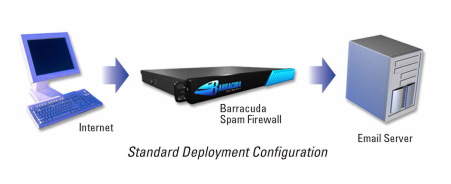
The standard deployment configuration of the Barracuda Spam Firewall consists of a single email server and a single Spam Firewall appliance. Simply connect the Barracuda Spam Firewall to your network by assigning it a new IP address and changing your MX record to point to the Barracuda Spam Firewall (see figure below). Alternatively, you may also give your email server a new IP address and give the old IP address to the Barracuda Spam Firewall. Other configurations include one  Barracuda unit and multiple email servers and multiple domains. For automatic scalability, redundancy and fault tolerance, you may cluster multiple Barracuda Spam Firewalls.
Looking for free Antivirus Software?

Antivirus Software provides an essential layer of protection from a multitude of virus, trojan, worm, spyware, adware, dialer, keylogger and rootkit infections.

Here are several free antivirus programs that you can evaluate and decide which one best suit your need:

1) Avast! Free Antivirus
http://www.avast.com/en-au/free-antivirus-download

2) Microsoft Security Essentials –
http://www.microsoft.com/Security_Essentials/

3) Panda Cloud Antivirus –
http://www.free-av.com/en/products/1/avira_antivir_personal__free_antivirus.html

4) AVG Anti-Virus Free Edition –
http://free.avg.com/au-en/homepage

5) Avira AntiVir Personal Edition –
http://www.free-av.com/en/products/1/avira_antivir_personal__free_antivirus.html

32-bit vs. 64-bit

The terms 32-bit and 64-bit refer to the way a computer’s processor (also called a CPU), handles information. The 64-bit version of Windows handles large amounts of random access memory (RAM)  more effectively than a 32-bit system.64-bit processors can represent larger chunks of data at a time than 32-bit  processors, allowing more efficient handling of all types of computer  calculations. Although 64-bit processing is inherently faster, it also requires  more RAM to accommodate the larger  chunks of data and provide better system performance.

32-bit operating systems can only use about 3.5 gigabytes (GB) of RAM, even if  you install more; 64-bit operating systems can use much more. For example, the  64-bit versions of Windows 7 Professional and Ultimate support up to 192 GB of  RAM. You need at least 4 GB of RAM in order to  experience an increase in system performance with 64-bit processing. If you have  less than 4 GB of RAM, moving to 64-bit could actually decrease system  performance.

Generally, 32-bit software is compatible with 64-bit versions of Windows, but  64-bit software is not compatible with 32-bit versions of Windows. Microsoft  notes that one exception to this is that many 32-bit anti-virus programs do not  work in 64-bit versions of Windows.

Also, it is not possible to upgrade directly from a 32-bit to 64-bit version of Windows or vice versa. If you want to make the change, you  will need to perform a clean install, which means that you will need to back up  your files and reinstall all your software.